
Is the HP LaserJet Pro M501dn the Right Printer for Your Office?
The HP LaserJet Pro M501dn impresses with its blazing speed and energy efficiency, making it an excellent choice for bustling office settings. With standout features like duplex printing and enhanced security, this printer merges high performance with resourcefulness. In this post, we'll explore its notable attributes, real-world use cases, and help you decide if it's the right fit for your needs. Discover more in our complete product details.
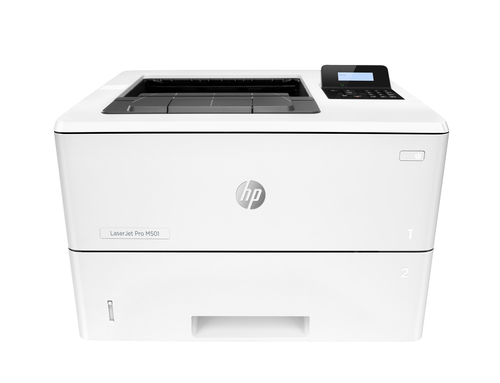
Unpacking Its Impressive Features
The HP LaserJet Pro M501dn boasts a print speed of up to 45 pages per minute, a significant advantage for any fast-paced office environment. This feature alone can streamline workflow and improve productivity. Moreover, its high-resolution printing capabilities ensure that every document comes out crisp and clear, which is essential for professional presentations and reports.
One of the standout features is the duplex printing capability. By printing on both sides of the paper, it not only cuts down on paper waste but also helps businesses reduce operational costs. The robust input and output capacity, coupled with a maximum duty cycle of 100,000 pages per month, means that this printer can easily handle the demands of high-volume offices. Imagine not having to worry about frequent paper jams or running out of paper mid-print. Ethernet connectivity ensures reliable networking across your office setup. It's a convenient feature for any business looking to maintain seamless connectivity between devices. For those keen to delve deeper into these features, our in-depth feature overview offers additional insights.Why Speed and Efficiency Matter
In today's business world, time is often equated with money, and the HP LaserJet Pro M501dn takes this to heart by offering rapid start-up times and exceptional processing speeds. This efficiency means office workers spend less time waiting and more time completing other tasks. High speed doesn't just boost productivity — it enhances employee satisfaction as well.
Additionally, the energy-efficient features of the M501dn can't be ignored. Firms are continually looking for sustainable solutions that align with both environmental goals and budget constraints. By consuming less power, this printer reduces utility expenses, making it a pragmatic choice for both small businesses and large corporations. Security, too, is a priority with the M501dn. With built-in features to protect against data breaches and unauthorized access, business owners can rest assured that their confidential information remains secure. For those interested in the broader implications of reducing energy usage in the workplace, the related insights offer a compelling read.Real-World Applications: Is It the One for You?
The HP LaserJet Pro M501dn finds its strength in environments that demand high efficiency and reliability. Consider a legal firm with heavy documentation processing or a medical office requiring confidential prints — this printer's speed and security features are invaluable. Meanwhile, its performance shines in finance or healthcare industries where secure, reliable printing is crucial.
But what about alternatives? In some cases, businesses might lean towards pricier models with additional features, but for many, the M501dn hits the sweet spot of price and functionality. It's often more beneficial to save on upfront costs while still enjoying robust capabilities. In my experience, relying on proven technology is usually more rewarding than chasing after the latest, high-cost innovations. Looking for other options? You might explore our other recommended models.Navigating Technical Jargon with Ease
Let's demystify some technical terms linked to the HP LaserJet Pro M501dn. DPI, or dots per inch, tells us about print quality; higher DPI means sharper images. JetIntelligence, a term you'll often hear, represents the technology in HP cartridges that optimizes performance, efficiency, and energy use. Built-in memory ensures that even large print jobs are processed smoothly, without hiccups.
Sometimes, jargon can discourage tech adoption, but understanding these basics can transform user experience. Often, people overlook such specifications, deeming them too complex, but they can significantly enhance a printer's performance and lifespan. There's a common myth that laser printers are slower than their inkjet counterparts — the M501dn shatters this misconception with its speedy delivery. In my IT journey, understanding hardware specs has often spelled the difference between effective and inefficient office solutions. For those wanting to explore more technical insights, our technical guide section is a valuable resource.HP LaserJet Pro M501dn: A Balanced Review
The HP LaserJet Pro M501dn earns points for its swift performance and vital security features, making it a reliable addition to any office. However, the lack of built-in wireless connectivity could be a downside for some. In Pennsylvania, several businesses have embraced this machine for its dependability and speed, proving its worth in demanding environments.
While its efficient nature and robust duty cycle are commendable for high-volume tasks, those needing wireless options might need to look elsewhere. That's not to say it lacks robustness — quite the opposite. For an honest take on its standing against other models, check out our review series.Setting Up Your HP LaserJet Pro M501dn
Starting with the HP LaserJet Pro M501dn is straightforward. Begin by unboxing the printer and following the setup instructions provided. Connect it to your network via Ethernet — this ensures stable and seamless connectivity. Installing the appropriate driver software is crucial, and it's typically available on the HP website.
Once configured, testing your first print job will acquaint you with its capabilities. Remember to use duplex printing, which saves on paper and contributes to cost efficiency. Optimizing security settings is another vital step, ensuring your sensitive documents remain protected. For a deeper dive into the setup process, refer to the official HP setup instructions. With practical guidance and a bit of tech-savvy, you'll have the M501dn up and running in no time, making it a trusted office companion.Conclusion
The HP LaserJet Pro M501dn stands out with its speed, energy efficiency, and robust security features, designed for those who value performance and reliability. It's particularly suitable for medium to large businesses that require consistent high-volume printing without compromising document security. However, when evaluating its fit for your workplace, consider your technological needs and current business operations.
While it's beautifully efficient and meets numerous demands, other IT solutions might present better opportunities for specific setups. If uncertainty still lingers, explore additional tech solutions or browse our online tech catalog for detailed specs and alternative recommendations.Frequently Asked Questions
Common questions about HP LaserJet Pro M501dn Black and white Printer, Ethernet Only; Duplex