Are AI-Powered PCs the Right Tech Boost for Your Business?
Imagine a world where computers do more than just crunch numbers—they think, adapt, and predict your needs. AI-powered PCs are shaking up the tech scene for businesses, promising not just a speed boost, but a whole new way of working. As businesses strive to enhance productivity and streamline operations, these PCs emerge as essential catalysts. Let's dig deeper into their cutting-edge features, time-saving benefits, and how they can transform how work is done.
Discover the Cutting-Edge Features
At the heart of AI-powered PCs lies their advanced processors—often equipped with Intel’s or AMD’s latest chips. These are not your typical processors; they integrate AI capabilities directly onto the chip. This means your PC can learn and optimize its tasks. Imagine having a computer that predicts the software you’ll need next or automatically adjusts graphics settings for optimal display. In my experience, tasks that took forever now complete in seconds.
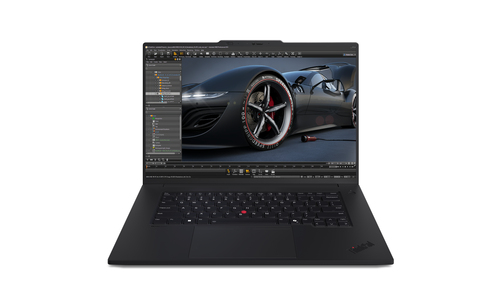
Machines like the Lenovo ThinkPad use AI to enhance battery life, adjusting power consumption based on usage patterns. Why does this matter? Because in a business setting, efficiency is king. Less downtime, better utilization of resources. Moreover, AI PCs elevate security mechanisms, recognizing user habits and detecting anomalies—offering a robust shield against cyber threats. And let's not forget about speed. Whether it's running complex algorithms or heavy computational tasks, the AI engines facilitate unmatched performance. For businesses engaged in high-stakes data processing, these PCs are a powerful ally, seamlessly blending smart tech with raw power. For a deeper dive into how these revolutionary features can benefit various industries, visit our category page.Unpacking the Benefits
The value of AI-powered PCs extends beyond just functionality. They introduce an era of efficiency—often automating mundane tasks and allowing businesses to redirect human resources to more strategic roles. Picture this: a system that auto-schedules your meetings, predicts the best times for client calls, and even drafts your reports. It's not just a productivity tool; it's a game-changer.
There’s also the cost-effectiveness factor. While the initial cost might seem steep, consider the long-term gains. Reduced operational costs and increased workplace efficiency often tip the scales in favor of these systems. A case study I recall from the IT services sector showed how integrating AI-PCs cut decision-making time by half, fueling business growth. These systems scale effortlessly too—adaptable to business expansions without hefty investments in new infrastructure. In today’s fast-paced tech environment, staying ahead often means embracing such innovations. For more insights on how AI-PCs can be the catalyst for a tech revolution in your business, check out this article about smart technology integrations.Real-World Applications That Make a Difference
Let's explore some real-world scenarios where AI-powered PCs are making waves. The education sector, for instance, uses AI PCs to personalize learning experiences, adapting to individual student needs—resulting in better engagement and outcomes.
In healthcare, AI-powered PCs assist in patient monitoring, data analysis, and even predictive diagnostics, a leap forward in patient care. Meanwhile, financial institutions harness these PCs for faster, more reliable data processing, enhancing fraud detection and risk assessment. One interesting use case comes from businesses employing 360 Virtual Room applications, often revolutionizing how meetings and collaborations happen. In the U.S., businesses adopting this tech report enhanced client interactions. But it’s not all rosy; there are challenges. The cost and complexity of integrating AI-powered systems can be daunting, particularly for small businesses. Yet, many firms find that the benefits outweigh these hurdles, as adaptable solutions become more accessible. For further inspiration on applying these technologies to your industry, take a look at other successful case studies on our category page.Is a Premium Option Always Worth It?
AI-powered PCs come in various flavors—from budget-friendly models to premium options with all the bells and whistles. The debate on whether the high-end variants are worth the investment isn't new. In my opinion, if your business relies on intense computational tasks daily, a premium model might justify the cost. They typically offer more robust features, superior durability, and premium support options.
However, if your operations are less demanding, a mid-range option could deliver the necessary performance without emptying your wallet. It does hinge on your specific needs—smaller businesses might find that high-tech isn't always the best fit. On the other hand, investing in an entry-level AI-PC can still provide significant upgrades over traditional computers, giving you a taste of improved productivity and performance. For an in-depth analysis of this, you might want to check out our examination of premium vs. standard models. Ultimately, assess your needs carefully and stay informed on the latest tech trends.Comparing Lenovo ThinkBook and Microsoft Surface Laptop
When it comes to selecting the right AI-powered laptop, two contenders that often come up are the Lenovo ThinkBook 14 G8 IAL and the Microsoft Surface Laptop 6. Both have their merits. The Lenovo ThinkBook offers a robust build and is known for its durability, making it great for businesses needing a workhorse laptop that can take a beating. It packs solid processing power and ample storage, which can be crucial for data-heavy tasks. Check out more details on the ThinkBook here.
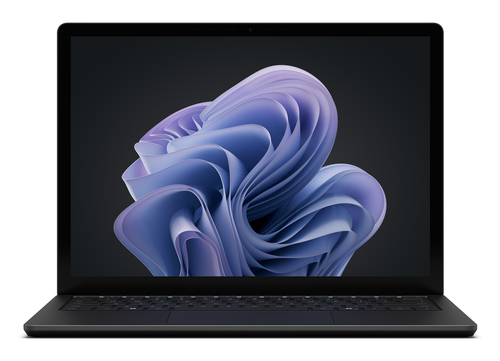
On the flip side, the Microsoft Surface Laptop 6 is celebrated for its sleek design and portability. It’s typically seen as a fashion-forward choice, perfect for professionals on the move who need a balance of power and elegance. For those interested, explore the Surface Laptop features. In my experience, industries that require heavy data processing lean towards the ThinkBook, whereas the Surface is well-suited for creative fields or where presentation matters.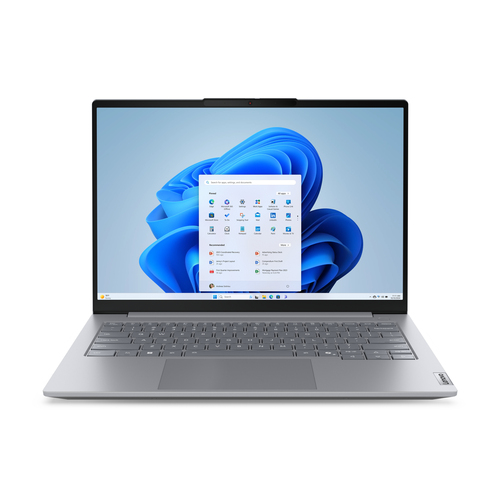
Getting Started with Your AI-Powered PC
Setting up an AI-powered PC might seem daunting at first, but it’s usually more straightforward than expected. First, out of the box, ensure all connections—keyboard, mouse, and essential peripherals—are secure. Power it on and complete the initial OS setup.
Next, configure the pre-installed AI software. Many systems come with a user-friendly wizard to guide you through basic setup tasks. Additionally, integrating vital business software early on is key. For performance optimization, ensure your device drivers are up to date; this often means using the manufacturer's update tool. Connect to a Wi-Fi 6E network if available for faster, more reliable internet. Generously allocate time to tweak the system's AI settings—these can noticeably improve your day-to-day tasks once accurately configured. Once familiar, you’ll find your workflow noticeably smoother. For comprehensive guides, Lenovo’s official website provides detailed setup instructions and troubleshooting advice.Conclusion
As businesses strive to stay ahead in a rapidly evolving tech landscape, AI-powered PCs offer solutions that blend future-ready capabilities with everyday practicality. From boosting productivity to enhancing decision-making processes, these advanced systems provide undeniable benefits. Are they the right fit for your business? Perhaps. Evaluate your needs carefully, considering the cost versus the value they bring. Engaging with a tech consultant might offer tailored insights for your unique operations.
Embracing this technology isn't merely about staying current; it’s about setting your business up for future resilience and success. Explore available models, and don’t shy away from asking for professional advice to ensure you choose the system best suited for your needs. Start planning for your tech upgrades today by checking out our resources on AI PC advancements—your business's next big leap awaits.Frequently Asked Questions
Common questions about AI PC