
Is the Logitech ERGO K860 Keyboard Essential for Healthy Typing?
The Logitech ERGO K860 is a cutting-edge solution in ergonomic keyboard design, aiming to tackle everyday typing discomfort. In today's tech-driven world, workspace enhancements make jobs not just productive but healthier. Consider your typing posture: could it be improved? The K860 might be the game-changer your workstation needs, promoting comfort without sacrificing productivity, ensuring a smooth and healthy typing journey.
A Feel-Better Typing Experience
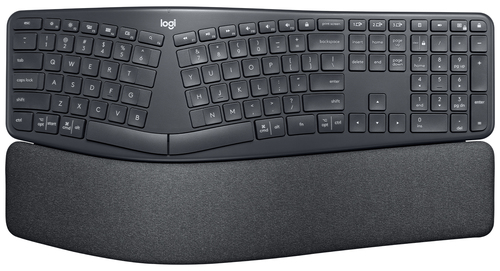
The Logitech ERGO K860 is quite the marvel when it comes to ergonomic design. With its unique split keyframe and curved layout, this keyboard is designed to support a natural typing posture.
These technical aspects might seem trivial, but they often, in my experience, mean the difference between comfort and discomfort. By placing your hands and forearms in a more relaxed position, there's typically less strain on your wrists. It reminds me of the days when I'd use traditional keyboards, often ending a workday with sore wrists. Imagine typing away, feeling no strain, and actually being more productive! Many who have switched to the ERGO K860 often find their productivity surges alongside comfort levels. It's easy to overlook how much these design elements matter until you experience the benefits firsthand. The keyboard’s gentle slope adds to its ergonomic charm, keeping your wrists free from pressure. Meanwhile, its generous palm rest assists in maintaining a natural posture. With reduced wrist strain, you might just find that work feels less like, well, work.Unpacking the Comfort Layers
The ERGO K860’s approach to comfort involves three essential ergonomic layers: surface, support, and comfort. Each of these is meticulously designed to enhance the typing experience.
The surface layer is crafted to offer a smooth texture for your palms, reducing any undue friction—something that’s often overlooked but makes a huge difference over lengthy typing sessions. Next, the support layer provides the necessary firmness, ensuring that your wrists are kept in a neutral, non-straining position. Then comes the comfort layer, which distributes pressure evenly across your hands and wrists, preventing the usual fatigue. Consider a scenario where you’re in the midst of a demanding project with back-to-back typing marathons; these ergonomic layers become your allies. With the pressure distribution features, you're less likely to feel that end-of-the-day soreness. Interested in how these elements work together? Dive deeper into the comfort features we discussed earlier to see how they complement the overall design. Each layer contributes to a balanced experience, addressing typical ergonomic woes.Precision Typing at Its Best
The ERGO K860 stands out not only for its ergonomic benefits but also for what I’d call precision typing. The keyboard’s Perfect Stroke Keys are crafted for ultra-accuracy, which can be a game-changer for heavy typists and developers alike.
Users rave about the tactile feedback, and that's no accident—the matte key surface is designed to help orient fingers without conscious thought, spurring a more intuitive typing motion. Personally, before using this keyboard, I often missed keys or found myself backspacing to correct errors. But with the ERGO K860's design, my typing has become effortlessly accurate. In a market flooded with options, it's hard to find a keyboard that balances comfort with such precise performance. Compared to other keyboards I've tried, the ERGO K860 doesn’t just meet basic ergonomic needs; it exceeds expectations. The combination of precision keys and thoughtful design is both subtle and revolutionary. When compared to other ergonomic keyboards, the ERGO K860's tactile experience really sets it apart, offering an impressive and reliable typing experience, often outperforming its peers in day-to-day uses.A Sustainable and Responsible Choice
Logitech’s ERGO K860 isn't just about personal comfort—it also stands as a testament to environmental responsibility. In today's world, where green initiatives are becoming a key consideration in tech products, this keyboard is a front-runner.
It’s made using recycled plastics and arrives in FSC-certified packaging, ensuring minimal impact on the environment. Logitech takes it a step further by achieving carbon-neutral certification for the ERGO K860. Typically, such commitments make a significant dent in our collective carbon footprint. The tech industry is gradually acknowledging the role it plays in environmental change, and with choices like the ERGO K860, consumers can opt for sustainability without compromising on quality. This conscious approach to sustainability in technology is a trend worth noting. Choosing a keyboard that's eco-friendly doesn't mean accepting less functionally. Quite the opposite, as this focus on sustainability usually complements the durability and overall design quality of the product. When selecting your next keyboard, consider the eco-credentials as part of your decision-making process. Every responsible choice adds up to a positive impact on our planet.Logitech ERGO K860: A Real-World Review
Now, let’s get down to brass tacks about the ERGO K860. Pros include enhanced comfort and significantly reduced muscle strain. Users, myself included, often report improved typing efficiency. However, transitioning from a conventional flat keyboard might take some getting used to.
Particularly in high-paced work environments, the ergonomic design can truly shine; typing or coding marathons feel more manageable. The keyboard's design supports natural hand positions, making relentless tasks like report writing or code debugging somewhat less arduous. For who benefits the most? If you often find typing cumbersome due to wrist pain or spend countless hours in front of a computer, this keyboard is worth a try. When pitted against other ergonomic options, the ERGO K860 stands strong, yet be prepared for a brief adaptation phase. Overall, I'd recommend it for those ready to invest in long-term comfort. The ergonomic benefits are pretty compelling, although you need some initial patience to adapt.Setting Up Your ERGO K860 for Optimal Use
So you’ve got yourself a Logitech ERGO K860—now what? Setting it up is quite straightforward. Connect using the USB receiver or switch to Bluetooth via the key located atop the keyboard.
For optimal use, start by adjusting the tilt legs to match your desk’s height and typing position; there are two settings that can make a big difference. Personnel, I've found the highest tilt works well for most standard desk heights. Next, personalize function keys to enhance productivity. You can assign shortcuts useful for your daily tasks, like opening apps or managing system controls. This can usually give you a productivity boost if you're juggling multiple applications or tasks. As for common setup issues, ensure your drivers are up to date. Should any stubborn issues persist, a quick visit to Logitech's support page can be invaluable. For new users, troubleshooting guides and FAQs offer great insights, often solving problems without the need for further assistance.Conclusion
To sum up, the Logitech ERGO K860 is more than just a keyboard—it's a health investment. Between its ergonomic support, commitment to sustainability, and precision typing, it offers substantial benefits.
This keyboard encourages a reconceptualization of what a modern workspace should be. If you often experience discomfort or long typing hours, it could be a game-changer. Wonder how a tweak in your setup could influence daily routines? Users often find that integrating healthier options can elevate productivity and well-being. Curious to feel the difference? Alongside its environmental credentials, there's never been a better time to consider making the switch. A more pleasant and responsible typing experience awaits those ready to embrace it. Ready to make a change? Consider checking out the ERGO K860 here for a healthier and more productive typing journey.Frequently Asked Questions
Common questions about Logitech 920-009166 keyboard Office RF Wireless + Bluetooth English Graphite