
Is the HP LaserJet Pro M501dn the Right Printer for Your Office?
Looking for a reliable office printer? The HP LaserJet Pro M501dn might just be your perfect match. With impressive speed and advanced security features, it ticks all the right boxes for a modern business environment. Not to mention, it's engineered for energy efficiency, giving it a competitive edge. Dive into our detailed breakdown to see why this powerhouse printer could be the hero your office needs. Check out more about its features here.
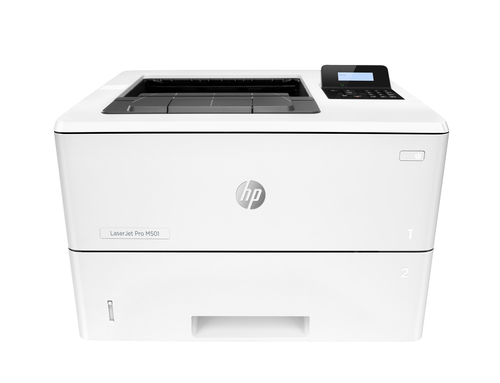
Speed and Efficiency: The Need for Speed
Ever found yourself waiting impatiently at the printer, wishing it could churn out pages faster? The HP LaserJet Pro M501dn prints at a lightning speed of 45 pages per minute. This means less time staring at your printer and more time focusing on what matters most. Imagine the productivity gains in a bustling office environment where every second counts. Employees can get their documents in hand and move on to their next task without breaking the flow.
Another stellar feature is its duplex printing ability—printing on both sides of the paper automatically. Not only is this a paper-saving gem, but it's also a step towards making your office greener. Now, think about how printing can affect your company's bottom line; saving on resources while boosting speed can make a world of difference. In high-pressure environments like law offices or busy corporate settings, operational efficiency is crucial. How much time can you save in a month with faster print speeds? It’s worth considering. Discover other advanced printing speeds that align with modern office needs and explore further details on the M501dn here.Guarding Your Documents: Security Features You Can Trust
In today's digital age, document security isn't just a luxury—it's a necessity. With potential data breaches lurking around every corner, the HP LaserJet Pro M501dn goes beyond simple printing capabilities. It features built-in security options like secure boot, which ensures that the printer isn't tampered with during start-up, and encrypted data storage, safeguarding your sensitive documents.
Many offices struggle with maintaining document confidentiality, with printers often being a weak link. How frequently do you hear about accidental leaks or unauthorized access through networked printers? The Pro M501dn addresses these vulnerabilities head-on. Its secure keypad access ensures that only authorized personnel can retrieve printed documents. This focus on security is indispensable in industries like healthcare or finance where compliance and privacy are key. In my experience, these features often provide peace of mind, knowing your office documents are not just sitting ducks for breaches. If you're looking for other security solutions you might consider for IT products, check out more here.A Closer Look: Toner Efficiency and Print Quality
When it comes to print quality, not all printers are created equal. The HP JetIntelligence Toner cartridges in the LaserJet Pro M501dn deliver high-quality prints at a cost-effective rate. In my experience, these cartridges not only produce sharp text but also ensure that tones are vibrant, which is crucial for client-facing documents.
With a resolution of 4800 x 600 dpi, this printer captures details with precision. Imagine handing out a proposal where every graphic stands out crisply—it’s those details that make lasting impressions. However, one downside could be the initial cartridge cost, which might seem steep but pays off with longevity and quality. Personally, I value printing quality highly because of its role in maintaining a professional image. If high-quality prints are on your office wishlist, the rewards of having a printer like this are plentiful. If you're curious about its toner technology and want to see if it fits your needs, see more rewards of having high-quality prints, and explore further details here.Capacity and Durability: Is It Built to Last?
For any busy office, having a printer that keeps up is essential. The HP LaserJet Pro M501dn boasts an impressive monthly duty cycle of up to 100,000 pages. Now, typically, this means it can handle hefty print jobs without batting an eye. And with a large input tray capacity, there’s less need for constant refilling, which is another time saver for employees.
When it comes to durability, think of this printer as the robust pickup truck of office equipment—it's built to endure and deliver consistently. In environments where high volumes are the norm, such as media and communications industries, having a reliable printer is non-negotiable. Budget, of course, is a factor in any office tech purchase. But with its solid build and high-capacity capabilities, you’re looking at a long-term investment rather than a quick fix. Curious about what makes office tech durable? Read more here, and find further details here.Real-World Performance: Our Honest Take
After spending some time with the HP LaserJet Pro M501dn, there are clear pros and cons to its performance. On the plus side, it’s exceptionally reliable and delivers top-notch print quality—perfect for discerning office environments. It's easy to use and its security features are a major asset.
However, a downside worth mentioning is the lack of wireless connectivity. For offices that prefer a seamless wireless setup, this might be a deal-breaker. In terms of practical applications, it's ideal for medium to large-sized offices that prioritize document security and efficiency. If the price tag feels steep, it's essential to weigh it against the features it offers. For those considering office tech investments, its cost is in line with what you'd expect for this level of performance and capability. Overall, it’s a strong contender if its features align with your needs.Getting It Set Up: A Step-by-Step Guide
Setting up the HP LaserJet Pro M501dn is pretty straightforward. First, connect the printer to your network using an Ethernet cable—this helps maintain a stable connection. Next, power it on and follow the prompts to install the necessary drivers. Most offices will appreciate its ease of integration into existing systems.
Once connected, it's time to initialize the printer. Make sure to configure settings for optimal performance—adjust print quality settings and enable duplex printing if desired. From my experience, dedicating time to fine-tune these settings can enhance your overall printing experience. If you encounter any hiccups, common issues like setup failures are often resolved by checking network configurations or restarting the device. And for personal tips? Always keep drivers updated for seamless function. Emphasize its user-friendly setup, especially useful for those new to office printers.Conclusion
So, does the HP LaserJet Pro M501dn fit the bill for your office? We've explored its impressive speed, robust security features, and reliable performance—all key selling points for a busy work environment. Sure, the lack of wireless connectivity is a minor hiccup, but its benefits typically outweigh this drawback. If security and speed are high on your list, perhaps this printer is exactly what your office needs.
What are your office priorities? This question might just lead you to a clearer decision. As businesses seek smarter technology solutions, integrating a capable printer into their arsenal can elevate operational efficiency significantly. Ready to make the leap? Discover more about why it might be the right fit here.Frequently Asked Questions
Common questions about HP LaserJet Pro M501dn Black and white Printer, Ethernet Only; Duplex