
What Should You Look for in a Business Laptop?
In today's fast-paced business environment, technology is constantly evolving, offering an array of laptop choices. Matching the right laptop features to your business needs is crucial for success. From processing power to portability, each factor plays a significant role in daily operations. As you navigate through this guide, you'll discover how choosing the right business laptop can enhance productivity and keep your business ahead of the curve.

Understanding Core Laptop Features
When it comes to the heart of your business laptop, the processor is the engine that drives performance. Whether you're considering an Intel® Core™ or an AMD Ryzen™, each offers unique strengths. Intel's offerings are known for their reliability in handling complex tasks, while AMD's Ryzen chips often deliver robust performance at competitive prices. Typically, a quad-core processor will suffice for general business tasks, but for those running more demanding applications, a hexa-core or even an octa-core might be your best bet.
Moving on to RAM, more is always better, especially if multitasking is a priority. With at least 8GB, you can efficiently run multiple applications without facing slowdowns. However, for power users, 16GB or more is recommended to ensure a smooth workflow. Storage is another critical area—do you go with a traditional hard drive (HDD) or a solid-state drive (SSD)? SSDs usually offer faster boot times and data access, contributing to a more seamless computing experience. This choice can directly impact productivity, making SSDs a worthwhile investment despite their higher cost. For those in need of extensive storage, a combination of SSD for system files and HDD for data storage often hits that sweet spot. As you explore these options, remember that finding the right balance of performance features to suit your specific business needs is key.Why Display and Portability Matter
It's often underestimated, but the display of your business laptop significantly influences your productivity. A screen with a Full HD or even WUXGA resolution will usually provide crisp visuals, reducing eye strain during long workdays. This is especially crucial for tasks involving design or extensive spreadsheets. Balancing this, the size of the screen also plays a role. A 15-inch model might be the sweet spot for many—big enough for comfortable viewing yet portable enough to carry around.
Speaking of portability, the weight and dimensions of your laptop should align with your mobility needs. If you're always on the move, a lightweight model can make a world of difference. Some professionals even opt for ultrabooks, known for their sleek designs and powerful performance packed into a featherlight package. Meanwhile, touchscreens are gaining traction for good reason. They provide a more intuitive interaction, allowing for quick navigation—a feature especially appreciated during presentations or meetings. Whether to choose a touchscreen depends largely on your specific usage scenario. If you’re often presenting or brainstorming on the fly, it’s a compelling option, though others may find it less necessary. In any case, ensuring your choice supports both your visual and mobility needs is crucial to overall efficiency.The Connectivity Edge: Why Wi-Fi 6E is a Game Changer
In our hyper-connected world, reliable internet is non-negotiable, and Wi-Fi 6E is the way forward, providing faster and more stable connectivity. It's particularly beneficial for those who rely on virtual meetings and remote work, where traditional Wi-Fi often falls short.
The primary advantage of Wi-Fi 6E lies in its ability to operate on a 6GHz band, which means less congestion and faster speeds. This technology allows multiple devices to connect without the typical slowdowns—perfect for bustling office environments or homes with numerous connected gadgets. But what does this mean for you? In practice, expect smoother video calls, quicker file downloads, and more stable connections in diverse settings. Imagine you're in the middle of a critical report submission, and your connection falters—frustrating, right? Wi-Fi 6E minimizes such risks, offering peace of mind with its enhanced capabilities. Adopting this technology can indeed give your business a competitive edge, as it ensures consistent communication and information flow, ultimately boosting productivity. Any business laptop worth its salt should ideally be equipped with this advanced technology to keep you ahead of the curve in our fast-paced digital world.Customization and Durability: Making Your Laptop Last
Choosing a customizable business laptop means the device can evolve as your needs change—an invaluable asset in today's dynamic work landscape. Many models offer upgradeable RAM and storage, allowing you to extend the life and capabilities of your device without the need for a complete upgrade. This adaptability is crucial, especially if you're anticipating growth or shifts in workload demands.
Meanwhile, durability shouldn't be overlooked. For example, devices like the Getac X600 are designed for those operating in rugged environments, blending toughness with the latest tech. These laptops withstand harsh conditions, making them perfect for field workers or those frequently on-site. Imagine avoiding the cost and inconvenience of frequent replacements simply by investing a bit more initially in a hardy, robust system—it's a decision often praised as savvy in business circles. In the long run, a durable laptop reduces unexpected expenses and downtime, freeing your focus for what really matters: innovation and service within your organization. It's this balance of customization and durability that ensures a laptop not only meets your current requirements but grows with your business, offering reliability you can count on.Comparing Options: Getac X600 vs. Lenovo ThinkPad T14 Gen 5
When comparing the Getac X600 Pro against the Lenovo ThinkPad T14 Gen 5, each presents strengths fitting different business needs. Getac's model, renowned for its rugged, durable build, suits those in demanding environments, offering resilience and stability. Sporting an Intel® Core™ i7 processor, it stands adept at handling intensive tasks. Contrast this with the Lenovo ThinkPad, donning a more compact design, perfect for frequent travelers or office-bound workers prioritizing portability.
Lenovo’s incorporation of the AMD Ryzen™ processor makes it powerful enough for most business applications while maintaining efficiency. Depending on your key priorities—whether it’s rugged durability or portability with performance—each device has its appeal. To explore these options further and see which might align better with your workflow, you might consider diving deeper into the specifications and user reviews. It’s often helpful to align your laptop choice with your operational demands, ensuring not just a fit but an enhancement to your work style.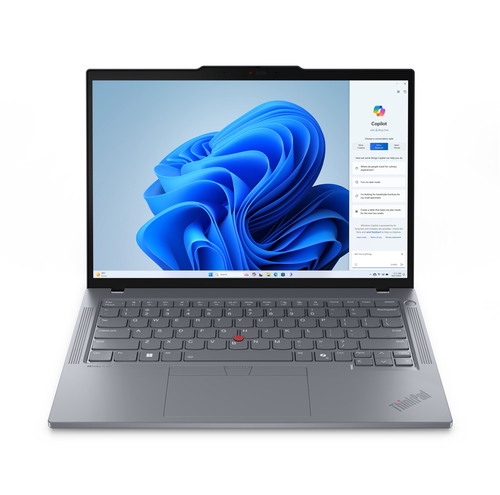
Setting Up Your Laptop for Business Success
To ensure your new business laptop is ready for high performance from the get-go, follow these essential setup steps. Start by installing necessary software—everything from office suites to specific industry applications. Next, optimize security features. Adjust your settings to enable firewalls, antivirus software, and encryption. This step often saves you from potential data breaches.
For those utilizing cloud services, setting up tools like Google Drive or OneDrive ensures you have seamless access to files and collaborative platforms anytime, anywhere. It's a booster for remote teamwork. Next, streamline your application organization. Pin frequently used apps to the taskbar and create folder shortcuts for quick access. It’s a small step that often improves workflow efficiency. Remember—your laptop's arrangement should reflect how you operate. Whether you’re focusing on presentations, data analysis, or client management, tailor the setup to facilitate productivity. Setting the foundation during this initial phase typically benefits your long-term business success. It’s these thoughtful arrangements that make all the difference in maintaining efficient, stress-free workflows in your work life.Conclusion
In conclusion, choosing the right business laptop hinges on matching features to specific needs, ensuring productivity and longevity. As we've explored, elements like core features, display quality, and connectivity bridges are vital in empowering your business operations. While it may be tempting to splurge on premium features, ensure they align with practical applications to maximize return on investment. Durability and customizability often outweigh glitzy specs, offering reliable service in the long run. Take your time weighing options, factoring real-world conditions and budget constraints. As you consider your next purchase, you're invited to explore further with Lenovo's extensive range. Each step of this decision-making process is an investment in your future efficiency and success.
Frequently Asked Questions
Common questions about Laptop