
Which Laptop Meets Your Business Needs? Unveiling Top Choices and Trends
Choosing the right laptop for your business is more than just a purchase; it's a stepping stone to heightened productivity, seamless mobility, and unmatched efficiency. As technology advances, with innovations like Wi-Fi 6 enhancing connectivity, the plethora of available options can feel daunting. We're here to demystify those choices for you, diving into the essential features, highlighting benefits, and comparing products to help you find that perfect laptop match.

Features and Specs: Deciphering the Tech
When it comes to business laptops, features and specs aren't just numbers—they're the backbone of what your machine can accomplish. Take RAM, for instance. Typically, business laptops these days come with at least 8GB of DDR5-SDRAM, offering the speed and efficiency required for multitasking. The processor is the brain of your laptop; with options ranging from Intel's i5 series to AMD's Ryzen, making sense of these terms is crucial. A robust processor ensures smooth execution of complex tasks.
Storage options vary between traditional HDDs and faster SSDs, with SSDs typically favored for their quick boot times and data retrieval speeds. Dive deeper into these choices in our detailed feature guide. Display quality shouldn't be sidelined either. A clear, vibrant screen can hugely impact how you work, especially if you're often analyzing data or crafting presentations. Meanwhile, newer tech like Wi-Fi 6—an upgrade that enhances speed and efficiency—translates directly to better productivity during the usual meeting lulls. In my experience, tailoring these features to your specific business needs ensures that each purchase adds value to your everyday operations, making these numbers and acronyms truly worth understanding.Benefits of Using the Right Laptop in Business
Having the right laptop is akin to having the perfect tool for the job; it makes everything easier. Businesses thrive on efficiency, and a well-chosen laptop can significantly enhance productivity. For instance, with a potent processor and ample RAM, tasks are executed swiftly, minimizing downtime. In environments where collaboration is key, technologies like Wi-Fi 6 foster smoother interactions, facilitating seamless communication and data exchange.
Consider the world of remote business meetings—a portable, lightweight laptop makes it a breeze to set up anywhere, turning those quick coffee shop stops into productive work sessions. Additionally, a laptop that integrates effortlessly with cloud services, such as data storage solutions, offers improved data management capabilities, ensuring that vital documents are always a click away. However, not every business requires the latest high-end models. Investing wisely means evaluating whether your needs demand cutting-edge specs or whether a mid-range model will suffice. Often, you can save on expenses without compromising functionality, repositioning those funds to other critical business areas. In essence, choosing the right laptop isn't just about specs; it's about enabling better outcomes in your everyday business landscape.Use Cases and Practical Applications
Laptops in business? They're not just gadgets; they're actual enablers of success across diverse sectors. From executive management needing portability and reliability for high-level presentations to field workers who require rugged, durable devices, the right laptop can truly adapt to varying business demands. In my experience, flexible laptops significantly benefit sales teams, whose needs include seamless tech integration during client presentations.
Meanwhile, creative teams often rely on powerful machines with top-notch graphics capabilities to handle intensive software for designing and editing. On the other hand, finance departments generally prioritize security features and processing power for handling sensitive data efficiently. Anecdotes from wide-ranging business environments affirm that versatility in laptop choice can greatly impact team efficiency. This adaptability to cater to different needs—all within the same organization—is invaluable. Consider reading more about how various business segments leverage technology in our practical application blog. Ultimately, choosing a laptop isn't just about what you buy but also what it helps you achieve—something every business can stand behind.Comparing Top Models: Acer Aspire vs. Getac S410 G5
Delving into business laptops, let's compare the Acer Aspire 1 with the Getac S410 G5. The Acer Aspire 1, often celebrated for its compact design and affordability, is perfect for the on-the-go professional managing light tasks. With a decent battery life and enough storage space, it focuses on essential functionalities without the hefty price tag. This makes it particularly attractive to startups or small businesses prioritizing mobility and style. Explore more details about this model.
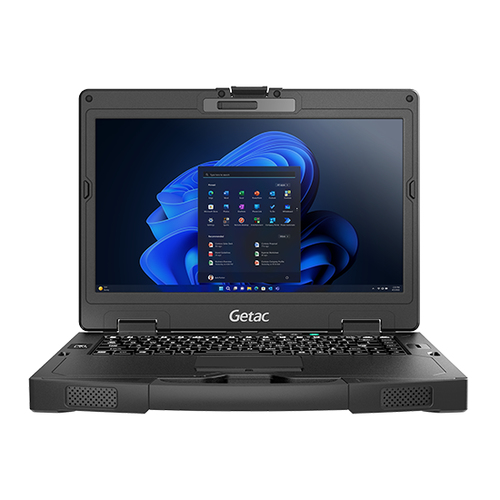
In contrast, the Getac S410 G5 caters to more demanding environments. Its robust build, paired with a touchscreen interface and enhanced durability, aims to withstand various harsh conditions. It's engineered with advanced specs, making it ideal for sectors like construction or field research that often put equipment to the test. Interested in thorough specs? Investigate this powerful model. By juxtaposing these models, it becomes clear that your laptop choice should align with your specific business requirements. While the Aspire suits those seeking simplicity and portability, the Getac's robust engineering offers durability and advanced capabilities for industries needing that extra resilience.Choosing Between Acer Aspire 1 and Getac S410 G5
When choosing between the Acer Aspire 1 and Getac S410 G5, consider your business's priorities. Acer Aspire 1 stands out as an affordable option, with its sleek design making it ideal for basic computing tasks like web browsing and word processing. For those seeking more information on this model, see more.
However, if your work requires more robust operations, the Getac S410 G5 is worth considering. With its powerful specs and enhanced durability, it's designed for demanding tasks like data-heavy computations or field operations needing resilience. To learn more about its capabilities, explore this. Understandably, each option caters to different needs, so assessing your specific requirements—balancing cost with functionality—is vital for making an informed decision.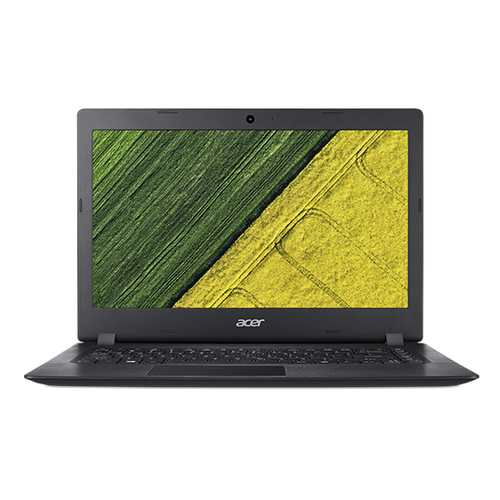
Setting Up Your Business Laptop for Success
Once you have your new business laptop, setting up for success is key. Start by installing essential software: office suites, communication tools, and productivity apps. You'll want to consider cloud services for seamless data backup and sharing. Adjust power settings to optimize battery life, especially for those mobile workdays. Security is paramount, so enable firewalls and antivirus software, keeping your data protected.
For peripherals, syncing with devices like printers and scanners ensures a smooth workflow. A pro tip: invest in ergonomic accessories such as a quality keyboard and mouse to enhance comfort and productivity. Finally, keeping drivers updated is crucial for maintaining optimal performance and avoiding tech hiccups. Setting up strategically can set a strong foundation for your business operations, optimizing how well your laptop serves you.Conclusion
Navigating the many laptop choices can be overwhelming, but aligning features with your business needs is critical. Whether it's balancing cost with function or evaluating long-term benefits, the decision you make today impacts tomorrow's productivity. Technology is fluid, with continuous advancements prompting periodic reassessments of your tech solutions.
Staying informed and adapting to new trends ensures your business remains competitive; after all, tech failures aren't costly—they're missed opportunities. Therefore, choosing wisely isn't just about today—it's about setting your business up for future success. As you embark on this tech journey, we encourage you to explore different models within our selection to find the right fit for your business needs.Frequently Asked Questions
Common questions about Laptop