
Is Microsoft Office 365 Personal the Best Home Office Suite?
When it comes to productivity tools that seamlessly integrate into both home and on-the-go lifestyles, Microsoft Office 365 Personal frequently tops the list. With a subscription that encompasses the latest full editions of Word, Excel, PowerPoint, and more, this suite ensures that you have powerful tools at your fingertips. But what makes this package especially appealing is its flexibility across devices and its array of features that enhance productivity. Whether you're a student, a home executive managing family schedules, or someone who loves to write, Office 365 Personal offers a tailored experience that adapts to various needs. With this suite, you're not just purchasing software; you're investing in a full-fledged productivity ecosystem. The question is, is it the right choice for your home office needs? Let's explore its features and benefits.
Comprehensive Access Anytime, Anywhere
One of the standout aspects of Office 365 Personal is its tremendous versatility. Designed for individuals who operate across different platforms, it allows installation on one PC or Mac and one iPad or Windows tablet. Whether you're drafting a report on a desktop computer or catching up on a presentation using your tablet, Office 365 Personal makes multitasking across devices a breeze. Moreover, with the Office Mobile applications for iPhones, Android, and Windows phones, you'll have your documents readily accessible right in your pocket.
- Use the latest full Microsoft Office applications for a year.
- Install on a PC, Mac, or tablet to match your tech ecosystem.
- Access your work from virtually any device, no matter where you are.
The key to its flexibility lies in the detailed synchronization of OneDrive. With a whopping 1TB of online storage, your files, photos, and media stay safely stored in your digital cloud. File-sharing permissions allow you to collaborate with other OneDrive users on any document. This opens up endless opportunities for teamwork, making it easier to manage and share substantial amounts of data. So, not only is your work accessible, but it's continuously in sync with your active lifestyle.
Discover more about Office 365's compatibilityEmpowering Tools Tailored for Productivity
Where Office 365 Personal truly shines is in its core applications, specifically Word, Excel, and PowerPoint, but it doesn't stop there. Let's delve deeper into each and uncover how they can make life simpler:
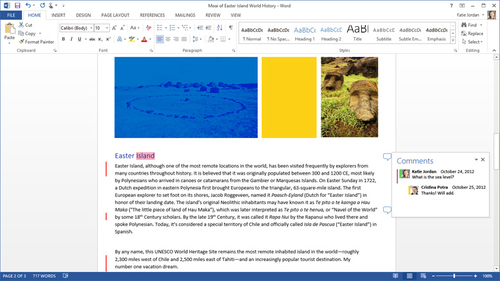
In Word, the ability to open and edit PDFs as if they were native documents saves substantial time and effort. Coupled with beautiful templates available in over 40 categories, Word becomes not just a writing tool but a canvas for creativity. Furthermore, features like 'Read Mode,' which effortlessly adapts text for easy reading, help make working even more comfortable.
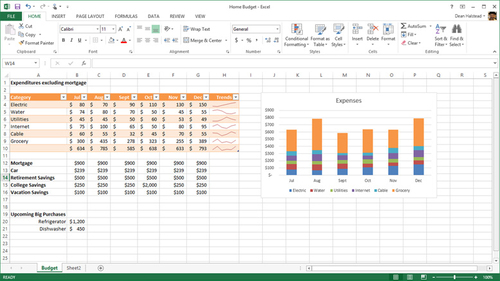
Excel takes data management to a new level, featuring workbook designs that provide freedom when working across multiple monitors. The 'Recommended Charts' button institutes a smarter approach to data visualization, offering intuitive ways to transform numbers into insights. Moreover, an expansion in functions across various categories establishes Excel as an essential instrument for personal data analytics.
PowerPoint, with its smart guides and improved presenter view, transforms presentations into captivating narratives. No more guessing when aligning elements; intuitive guides display real-time alignment. Supported multimedia formats now include high-definition content, adding visual impact to professional presentations.
Beyond the Basics: Additional Features That Stand Out
Office 365 Personal goes beyond the staple applications, offering powerful tools like Outlook, OneNote, Access, and Publisher. Outlook transforms how you manage contacts and schedules, integrating seamlessly through the People Card and offering insight with calendar views that include weather updates. OneNote supports touch-capable devices, providing smooth drawing and editing experiences ideal for jotting down or brainstorming ideas.
- Outlook merges email and social updates on one cohesive platform.
- OneNote converts handwriting, enhances note-taking versatility, and supports various files.
- Access and Publisher expand project management and publication tasks.
With the upgraded Access, creating apps for tracking data is straightforward, supporting accuracy with smart typing tools and drop-down menus. Publisher offers prebuilt content blocks to rapidly develop polished publications personalized to taste. This suite genuinely fulfills a wide spectrum of home office functionalities.
Read more about unleashing the full potential of Office 365 Personal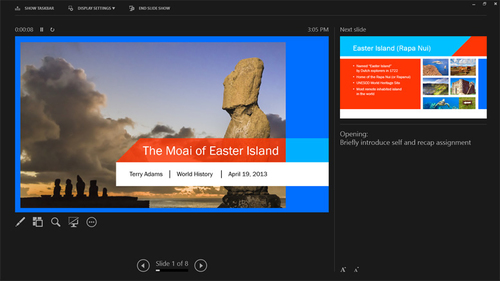
Why Choose Office 365 Personal?
Still wondering why Office 365 Personal could be the perfect fit for your needs? It's the amalgamation of accessibility, enhanced productivity tools, and storage capabilities that sets this suite apart. With the added value of 60 minutes of Skype calls monthly to over 60 countries, communication barriers shrink further, keeping you connected globally.
Whether you rely on its capabilities for school projects, business proposals, or creating delightful family photo albums, Office 365 Personal integrates into your life, adapting to ever-changing demands. You are not just buying software; you are investing in a companion that supports every chapter of your professional and personal endeavors.
Invest in your productivity today. Follow the link to our detailed product review. Make the smart choice for your home office setup, and watch as Microsoft Office 365 Personal impacts your organizational success.