
Why Pick A Desktop PC: Top Choices for Modern Businesses
In the rapidly evolving world of business tech, desktop PCs often get overshadowed by their more portable cousins: laptops. However, they offer stability and power that's hard to beat for commercial use. In this article, we'll dive into why desktop PCs remain a viable tech solution for businesses, their specific benefits, and the ins and outs of selecting the right one.

The Unmatched Power of Desktop PCs
When it comes to raw power, desktop PCs typically outshine laptops. In my experience, the speed and expandability of desktops cater perfectly to demanding business tasks. Unlike most laptops, which offer limited upgrade options and are prone to overheating, desktops incorporate advanced cooling systems that keep everything running smoothly—keeping performance throttling at bay. It's like having a marathon runner who never tires. This reliability proves crucial, especially during long work hours.
Moreover, business tasks often require processing many data set—something desktop PCs manage with ease. They generally feature higher processor speeds and the ability to handle multiple applications simultaneously without hiccups. Over time, businesses will see that desktops not only sustain heavy computational loads but handle them with grace. While laptops might win on portability, desktops reign supreme in power efficiency.
To add to that, recent benchmarks illustrate their prowess. Metrics reveal that desktops with high-end graphics and the latest Intel or AMD processors deliver performance levels that laptops can hardly match. According to our previous article, desktops frequently outdo their portable counterparts when crunching numbers or rendering graphics. This makes them the go-to choice for professionals not just seeking power but dependability, offering future-proofing elements like scalability and more comprehensive software compatibility.
Cost-Effective and Long-Term Investment
Choosing a desktop can offer substantial long-term savings, something that's often overlooked. Here are some key reasons why desktops might just be the best bang for your buck:
- Initial Cost Savings:
Desktops usually cost less than laptops with equivalent specifications. Their value grows over time as their components are frequently less expensive to replace or upgrade.
- Longevity and Durability:
Built to last, desktops often outlive laptops since they are less susceptible to damage from mobility. This results in fewer replacements and repairs, ultimately saving businesses money.
- Energy Efficiency:
While desktops have historically been energy guzzlers, recent models incorporate energy-efficient components. Over the years, this translates to reduced electricity bills.
By investing in desktops, businesses gain a reliable partner that, over time, often pays for itself through retained performance and reduced maintenance costs.
Scenarios for Optimal Use
Picture a bustling environment—perhaps a design studio or a data analysis firm. It's here that desktop PCs truly shine. For example, graphic designers often harness the multi-core processors and hefty RAM desktops provide to run resource-intensive software like Adobe Creative Suite. Laptops might hiccup here, but desktops tackle these tasks with ease. Similarly, for data analysts crunching massive datasets, desktop PCs offer robust processing power, helping companies make faster, data-driven decisions.
Expanding further, businesses engaged in extensive multitasking benefit from desktops. Take a customer service center—here, desktops afford operators the ability to manage multiple applications without slowdown. As someone who has spent years in IT support, I've seen desktops handle this beautifully, even during the busiest times.
For companies looking to future-proof their operations, investing in desktops brings peace of mind. Browse our category page for tailored options that seamlessly integrate with existing infrastructures, proving that desktops are not just a tool, but a business asset.
Considerations for Choosing a Desktop PC
When selecting a desktop PC, several factors should weigh on your decision. First, performance needs dictate the foundational specs. High-end processors and extensive RAM can be pivotal for jobs requiring heavy computational power. Yet, this isn't the only consideration. Space constraints often come into play, especially in smaller offices. Compact desktops can save precious space while offering nearly the same capabilities as their bulkier counterparts.
Moreover, user preference regarding the operating system can't be undervalued. Compatibility with existing software is crucial, particularly for businesses entrenched in specific ecosystems. The flexibility in configuration—offered by brands like Dell and Lenovo—enables tailored solutions that meet unique needs.
That said, assembly or setup might present headaches. For those not tech-savvy, it's worth noting that initial setup can be complex, requiring professional assistance. Mitigation involves ensuring compatibility with existing IT systems and considering potential expansion needs. Businesses in flux should remember to plan for scale—future-proofing isn't just a buzzword, but a necessity in today's fast-paced markets.
Head-to-Head: Lenovo's Top Desktop PCs
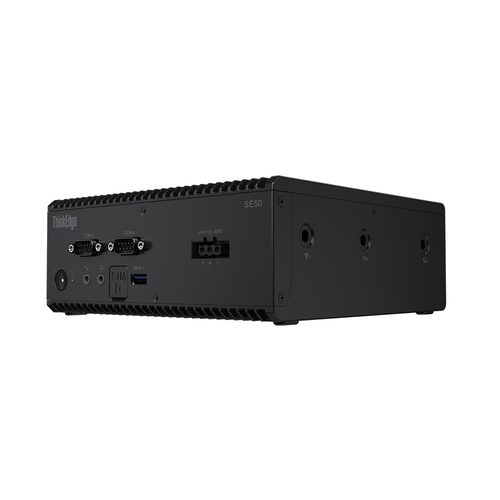
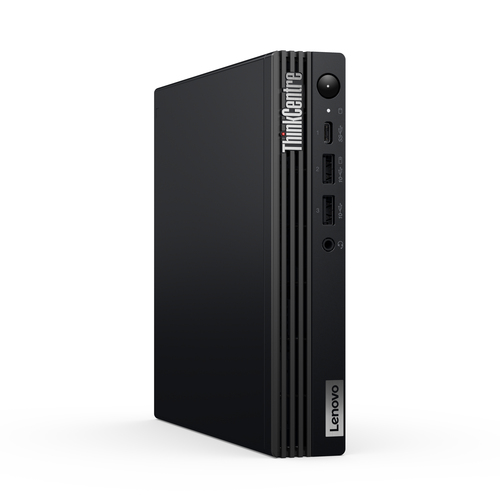
When comparing Lenovo ThinkEdge SE50 with ThinkCentre M70q Gen 5, distinct advantages emerge for varied business applications. The SE50 boasts a robust i7 processor, allowing for seamless handling of heavy workloads—ideal for designers or engineers needing smooth, intensive computational performance. Meanwhile, the M70q, with its efficient i5, targets routine office tasks, providing reliable efficiency at a lower price point–a practical choice for cost-conscious businesses.
Diving deeper, RAM capacities and SSD storage define these models. The SE50 comes with larger RAM and SSD configurations, enhancing multitasking capabilities and data processing speeds—essential for high-volume media creation or large data analysis projects. In contrast, the M70q balances affordability with functionality, offering standard RAM configurations suitable for everyday tasks like word processing and customer management.
Additionally, operating system advantages shouldn't be underestimated. Both models support the latest Windows OS, but the enhanced security features of the SE50 stand out for businesses with higher security concerns. The advanced features and affordable options these models offer cater to varying business needs, ensuring that choosing a desktop doesn't just fit your present but aligns with future plans.
Setting Up Your New Desktop PC for Success
Embarking on the setup of a new desktop can be daunting, but the process isn't inherently complex if approached methodically. Start by ensuring all components are correctly connected. Critical first steps include secure connection to the power supply and peripherals like a mouse, keyboard, and monitor. Many missteps arise from overlooked connections, so it's vital to double-check each plug and port.
BIOS checks are next—ensuring any BIOS settings align with hardware components optimizes performance from the get-go. Proceed with OS installation. Windows or Linux, whichever suits your business ecosystem, should be carefully installed and updated. Skipping updates can create vulnerabilities.
Software setup follows. Boy, it can be overwhelming, but it’s crucial. Install necessary business applications, configuring them to specific user roles. Network integration is another hurdle, where ensuring stable internet connection and cybersecurity safeguards protect data integrity.
Include a step-by-step checklist to streamline these actions: 1. Connect all hardware. 2. Perform BIOS checks. 3. Install and update OS. 4. Setup business software. 5. Integrate network and security settings. This checklist, simple but effective, bridges the gap between hardware setup and operational readiness, ensuring your desktop is ready to boost productivity day one.
Conclusion
Ultimately, selecting the proper desktop PC for your business hinges on understanding the trade-offs between power and portability. Desktops offer undeniable strengths: stability, longevity, and cost-effectiveness. But don't be swayed solely by the allure of mobility. Portable devices are indeed tempting; however, desktops frequently provide the reliable core a business depends on.
Think critically about what your business needs are—today and tomorrow. Do you prioritize performance over portability, or perhaps long-term cost savings over initial outlay? Our expert view remains that desktops, with their adaptability and robust nature, often serve as the backbone of successful businesses.
Visit our category page to explore options tailored to your requirements and embark on a tech journey that aligns with both your immediate goals and future aspirations. Let us guide you to informed decisions that benefit your business not just today, but in the years to come.
Frequently Asked Questions
Common questions about Desktop PCS