
Do You Really Need a Firewall? Here's What IT Pros Say
In today's ever-evolving tech landscape, firewalls are vital for network protection. As cyber threats become more sophisticated, the simplicity of hardware-based solutions becomes even more appealing. Both businesses and individuals must prioritize firewall security to safeguard IT products and technologies. Covering both personal and professional contexts, we'll explore why firewalls remain indispensable in 2023. Let's discuss various types, highlighting their crucial roles in maintaining robust defenses in the face of increasing cyber threats.
Understanding Firewall Basics
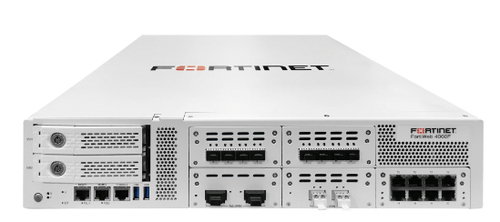
A firewall is like a digital bouncer, standing at the entrance of your network, ensuring only authorized traffic comes in and goes out. At its core, it segregates a trusted internal network from untrusted external networks. Firewalls may be hardware or software-based. While software firewalls offer basic protection, hardware firewalls provide a sturdier barrier, especially critical in business environments where data sensitivity is paramount.
Consider this: a firewall acts as a sieve, filtering water by catching only particles of a certain size. Similarly, it screens data packets against predefined security rules to allow or block them. However, many still believe a firewall is a one-size-fits-all solution. This misconception can be misleading. In reality, each business has distinct needs, and the misconception that any firewall will suffice often leads to security vulnerabilities.
In business tech environments, hardware firewalls are like thick walls in a fortress, crucial for protecting sensitive data. However, common misunderstandings can arise—such as assuming all firewall solutions require complex configurations. Our other guide offers insights into simplified settings. It is essential for both tech-savvy and non-tech users to recognize the tailored fit of different types of firewalls to their needs, enhancing both protection and peace of mind.
Why Choose a Hardware Firewall?
Hardware firewalls are often the go-to for businesses seeking robust network protection. But what makes them stand out compared to their software counterparts?
- Robust Security:
Hardware firewalls excel in providing strong defenses against external threats—cutting off potentially harmful traffic before it even reaches your network.
- Performance Speed:
These devices operate independently from your system, preventing performance lags. They ensure seamless data flow, crucial for businesses with high data demands.
- Customization and Control:
They offer greater control with customizable settings, allowing businesses to tailor security protocols to meet specific operational needs.
So, while software solutions have their place, hardware options provide a more bespoke and secure fit for business requirements.
Feature-packed Firewalls: What to Look For
Diving into the critical features of firewalls, it's like assessing the specs of a new car. You need to consider throughput speed as the engine power—vital for businesses that rely on rapid data exchange. VPN support acts like the sleek design—streamlining operations by enabling secure connections remotely. In industries that demand robust security, such as financial services or healthcare, high throughput and strong VPN support are indispensable.
When it comes to total cost of ownership, consider it the vehicle's fuel efficiency. You don't want a solution that costs a fortune to maintain over time. Warranty periods, often skipped, are another consideration—though not all agree they're worth it. Here, a nuanced view can save future hassles, much like avoiding a gas-guzzler. Certifications act like a badge of reliability, assuring you of a baseline of expected performance.
However, pitfalls exist. Some installations can be overwhelming for smaller enterprises—like driving a fuel-efficient car that costs more due to high maintenance fees. Our network appliance category delves into these issues, providing a treasure trove of insights. Making the right choice involves peeling back these layers; understanding these nuances helps ensure the investment aligns with operational priorities and budget constraints.
Future-proofing with Firewalls
The rise of AI technologies and machine learning heralds a new era for firewall capabilities. It's like moving from dial-up to fiber optic—AI empowers firewalls to predict threats before they become an issue, providing business owners peace of mind. Scalability and adaptability feel much like investing in a modular house; you may start small, but there's room to grow. As your business evolves, your firewall solution can scale seamlessly.
Firewalls as investments echo the importance of planning for the unpredictable. Companies with stringent compliance needs, particularly in industries like finance or healthcare, will find that a solid firewall architecture manages not only data protection but also regulatory standards. Engage with real stories—cleaning company PHP switched to an AI-supported firewall, evidenced by a 30% reduction in threat responses.
While businesses naturally resist change, the security landscape shifts rapidly. Upgrading firewalls can mean the difference between thriving or encountering make-or-break outages. Our stories show how firewalls have not just mitigated risks but enhanced broader IT strategies. Ultimately, by embracing firewalls now, you're not just installing a security product—you're investing in future resilience.
Firewalls Face-off: WatchGuard Firebox vs. Palo Alto Networks
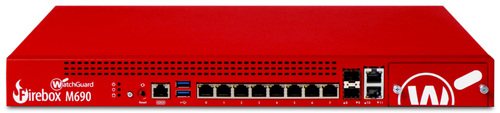
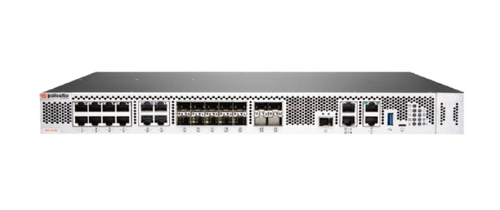
When comparing this advanced product from WatchGuard Firebox M690 with the innovative solution by Palo Alto Networks PAN-PA-3410, you'll find quite the dynamic matchup. The Firebox M690 offers excellent throughput capacity—ideal for high-traffic environments with demanding data requirements—while Palo Alto focuses on speed and AI integration, sharpening its edge in dynamic threat landscapes.
For sustained usage, Firebox's superior MTBF stands out, as it’s built to last much like a trusty pickup that won’t quit on you during a long haul. In contrast, Palo Alto’s emphasis on speed feels akin to driving a race car—it’s fast and agile. But connectivity comes easy with both, although setup varies: Firebox offers ease-of-use much like plug-and-play, while Palo Alto’s speediness might mean an initial learning curve, as would mastering stick shift.
Vendor support can be like choosing between a luxury or economy vehicle. Firebox’s long warranties resemble an extended guarantee, providing peace of mind. Palo Alto may offer rapid updates, enhancing performance, but you might miss that proverbial safety net against the unexpected flub. Ultimately, explore Firebox's details here or delve deeper into Palo Alto's range for a firsthand comparison tailored to specific requirements.
Setting Up Your Firewall: A Quick Guide
Setting up a firewall isn't everything you've seen in spy movies, but it requires some prep work. Begin with a site survey—measure power points and network cable lengths, ensuring placement maximizes coverage. Akin to plotting your home’s WiFi router, a strategically placed device avoids weak spots.
When unboxing your firewall, don't panic. Even if cables appear labyrinthine, they’re as color-coded as Christmas lights—just follow manufacturer guidance. Plug in power, connect network cables, and ensure LEDs illuminate happily.Configuration often feels like setting an alarm clock—a few adjustments ensure smooth functioning. Access your firewall's configuration interface, where initial setup walks you through network policies. If scratching your head sounds familiar, take heart—you're not alone. Common frustrations, like software misalignment, have simple fixes: navigate settings menus via helpful troubleshooting articles. Be prepared for unexpected roadblocks, similar to traffic detours when least expected.
Ongoing management involves periodic checks like revisiting your GPS map—a sporadic update ends up saving countless detours. Ensure security updates remain current and compliance checks prime. A trusty companion ought not feel like a burden; decide when hiring a trained technician to streamline processes becomes a worthy investment. Configurations can be DIY, but sometimes enlisting professionals prevents crashes before the finish line. Balancing DIY with professional upkeep enriches your security framework.
Conclusion
Reinforcing your network's security starts and ends with a robust firewall, undeniably crucial for today's business landscape. Whether you're deciding between models with varied features or exploring next-gen technologies like AI integration, aligning firewall capabilities with home or office demands positions you ahead of threats. Consider upgrading—outdated systems could invite risks rather than repel them. And, as you evaluate choices, our category page offers valuable insights in this evolving marketplace.
Ultimately, a well-chosen firewall transforms cyber risk management into a strategic opportunity. Safeguard digital assets—now, more than ever, proactivity pays off handsomely.Frequently Asked Questions
Common questions about Firewalls