
How Do You Choose the Best Laptop for Your Needs?
In today’s tech-driven world, laptops have become indispensable tools, playing pivotal roles in everything from education to advanced gaming. Choosing the right laptop involves considering several factors, like budget, performance, and portability. With a multitude of options available, making an informed choice can be daunting. This blog offers valuable insights and tips to help you navigate the world of laptops, ensuring you find a perfect fit for your unique needs.

Understanding Laptop Specifications: What Really Matters?
When diving into laptop specifications, it’s essential to focus on the fundamental components like processors, RAM, and storage options. Processors, often referred to as the brain of the computer, come mainly from Intel and AMD. While Intel is known for its reliability and performance, AMD typically offers more bang for your buck, especially in multitasking and gaming. Personally, I've found that having a powerful CPU dramatically improves efficiency—making those tedious software hang-ups a thing of the past.
RAM, meanwhile, acts as the laptop’s short-term memory, critical for multitasking. Whether you frequently juggle multiple tabs or software suites, investing in 16GB of RAM can provide a smoother experience. Many overlook this aspect, but trust me, it makes a huge difference when running demanding programs. As for storage, SSDs are typically faster and more reliable than traditional HDDs. They offer quicker boot times and faster data retrieval. Choosing wisely among these core specs impacts the overall performance significantly. If you're intrigued by more detailed business-related specs, our blog on business laptops provides deeper insights.Features vs. Price: Is Premium Worth It?
Balancing features and price is a tightrope walk most laptop buyers face. While premium laptops often boast the latest tech, including ultra-fast processors and high-resolution displays, they may not always be the best investment for everyone. Take a student, for instance; they typically require basic functionality for tasks like word processing and browsing. Spending extra on high-end graphics might not make sense for them.
On the other hand, a graphic designer needs superior color accuracy and processing power, making those premium features a necessity rather than an option. That said, it's important to weigh these features against your specific requirements. Anecdotally, I once overspent on features I never ended up using, which taught me to assess needs meticulously. Considering potential trade-offs before committing can save both money and regret. Our dedicated section on business laptop features offers a nuanced understanding of when premium is worth the price.Practical Applications: Matching Laptops to Your Needs
Choosing a laptop tailored to specific practical needs is paramount for maximizing efficiency. Students, for instance, often need lightweight models with robust battery life to keep up with their on-the-go lifestyle. A laptop that lasts through long lecture sessions—and then some—becomes their best friend. Conversely, gamers should prioritize laptops equipped with high-performance GPUs and cooling systems to smoothly run demanding titles.
Productivity-focused individuals, like those in administrative roles, may find a Lenovo ThinkPad particularly advantageous. Its reputation for durability and functionality suits a fast-paced work environment perfectly. For creative professionals, the MacBook with its intuitive software ecosystem and sleek design often comes as a recommended choice. Anecdotes from daily life show how a balanced choice enhances performance without overspending. For instance, my decision to opt for a category-linked laptop for travel led to seamless work collaborations on the go. Recognizing these distinctions ensures that your choice matches both professional and personal demands.Exploring Connectivity and Compatibility
In today’s hyper-connected world, having a laptop with modern connectivity features is not just a bonus—it's a necessity. Technologies like Wi-Fi 6E significantly enhance internet speed and stability, a game-changer when streaming, gaming, or working remotely. I recall frustrations with older devices unable to cope with simultaneous connections at home, underscoring the importance of these upgrades.
Ports may seem mundane but are crucial for peripheral connectivity. Thunderbolt ports, for instance, offer faster data transfer rates and versatility with different devices. With the increasing demand for laptops to act as multimedia hubs, these features become vital. Devices that facilitate seamless connectivity cater to both professional and personal use, from business meetings to family zoom calls. To wrap it all up, assessing business connectivity needs offers a clearer picture of ideal configurations.Lenovo ThinkPad T14 Gen 5 vs. Apple MacBook Pro: Which Reigns Supreme?
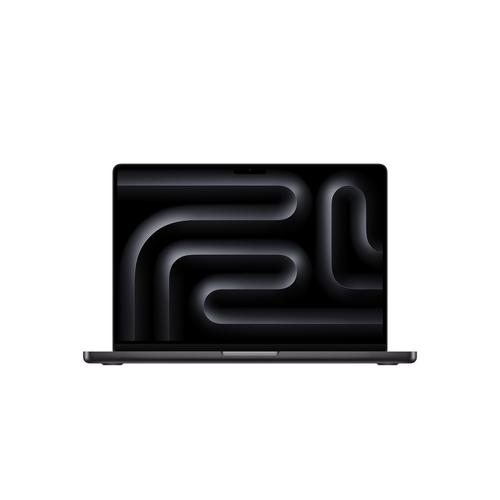
Choosing between the Lenovo ThinkPad T14 Gen 5 and the Apple MacBook Pro can feel like navigating a technology maze. Lenovo's productivity-focused design, bolstered by the AMD Ryzen processor, excels in multitasking—ideal for corporate environments. Meanwhile, Apple's M5 chip shines in creative tasks, offering unmatched performance in graphic-intensive applications.
Both models feature Wi-Fi 6E and SSD storage, enhancing speed and connectivity. However, ThinkPad's reputation for robust business adaptability contrasts with MacBook’s artistic and AI-friendly ecosystem. Ultimately, tech enthusiasts and professionals must weigh these models against their specific use cases, ensuring that the laptop fits like a glove to their daily workflow.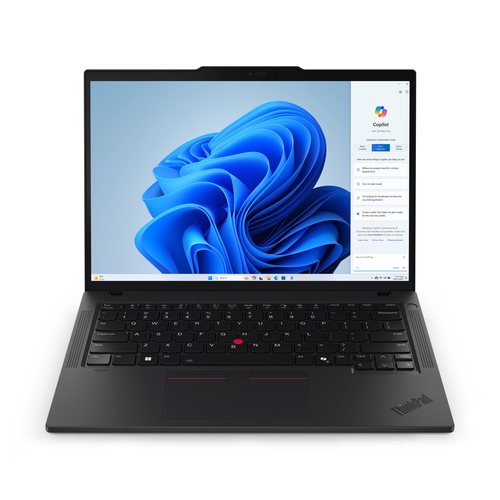
How to Set Up Your New Laptop for Optimal Performance
Setting up a new laptop is a step-by-step process that can set the stage for smooth operations down the line. Start by booting up the system and carefully going through the initial OS setup, ensuring all settings align with your preferences. Connecting to Wi-Fi 6E is next—enabling seamless browsing right away.
It's worth investing time to optimize power settings for better battery performance, a small step that pays dividends in the long run. Personal tips from my experience also include organizing files into easy-to-navigate folders and promptly installing essential software like antivirus and productivity tools. Don't overlook exploring advanced features such as virtual desktops and security options. Remember, a well-planned initial setup fosters efficiency and protects your investment for the future.Conclusion
In summary, aligning a laptop’s specifications and features with your current and anticipated needs is crucial for making a sound investment. That's why embracing technological solutions from an online tech store or local outlets, especially those offering diverse portfolios, is wise. As IT products continue to evolve, they increasingly enhance our daily interactions and productivity. This continuous innovation underscores the importance of making informed decisions. As you ponder your options, remember that today's right choice could be tomorrow's trusted partner, enhancing your personal and professional life in unexpected ways. Ready to explore your perfect match? Dive into our curated category and uncover possibilities tailored just for you.
Frequently Asked Questions
Common questions about Laptop