
What's the Best Laptop for You? We Break It Down
In today’s digital world, the variety of laptops out there can seem endless—especially within the rapidly evolving business technology landscape. This is why a little guidance is necessary to navigate this vast terrain. The process involves understanding the core features, recognizing their benefits, and how they apply to your specific use scenarios. Not to mention, we’ll also touch on a product comparison later, aiming to arm you with all the info you need for an informed decision.
Understanding Core Features and Their Importance
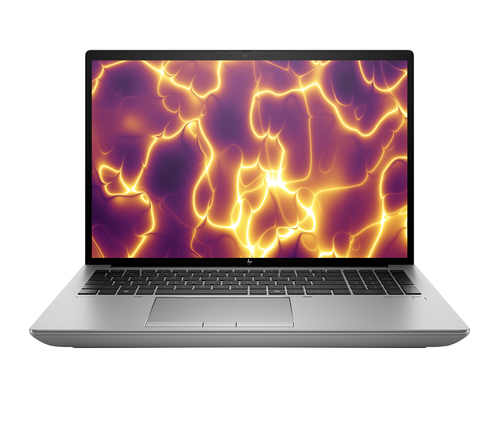
When it comes to laptops, it’s all about the specs, folks. Central Processing Units (CPU), Random Access Memory (RAM), and storage options like SSDs or HDDs really define a laptop’s performance. Think of the CPU as the ‘brain’ of your laptop—the AMD Ryzen™ 5 PRO or Intel® Core™ i5 are popular choices that offer smooth handling for everyday tasks. RAM, on the other hand, is your desk space—the bigger it is, the more papers (or tasks) you can spread out comfortably. If your desk is cluttered, well, things can get sluggish, right?
Reading the spec sheet carefully can help you avoid 'bottlenecks'. Ever tried downloading a game that takes forever to load? It might be the storage or RAM playing tricks on you. So, identify if you’ll be doing small calculations or huge data crunching. That’s key to deciding if an upgrade is necessary. Understanding features isn't just tech-speak, it's practical know-how. Pro tip: look for laptops with solid state drives (SSDs) over traditional hard drives if speed's your need. For more on the 'why' and 'how', our technology category page offers a deeper dive. Who knew there'd be so much to one little machine?The Benefits: What You're Really Paying For
You know what they say about getting what you pay for, right? Well, this rings true in the laptop world, too—particularly when considering high-end models. Sure, they come with a heftier price tag but dive into ‘why’, and you’ll find loads of benefits like increased portability, longer battery life, and sharper displays. Not to mention, multitasking becomes a breeze with these powerhouses.
I remember when I was working remotely, and all I had was a basic laptop. Let’s just say it was more ‘molasses in winter’ than ‘lightning fast’. Investing in a high-end model improved my productivity tenfold. And what about future-proofing? Consider your needs—not just now but down the line. Will you be doing more complex tasks, or is simple web surfing your speed? It’s wise to ask yourself these questions. Do you need a machine that’s super light for travel or something robust for video editing? Makes you think, doesn’t it? Looking ahead, see how these business-focused insights could refine your choice. Sometimes, the right investment does more than just save time—it preserves sanity.Practical Applications: Where Laptops Shine
Different laptops fit different use cases, just like how a chef’s knife differs from a paring knife. A lightweight model might be perfect for business travel—think hopping between tech conferences. Meanwhile, powerful processors cater to graphic designers who need every ounce of speed and efficiency. On the tech front, attending trade events in Pennsylvania opened my eyes to such niche needs. Each choice comes with its trade-offs: ultra-lightweight laptops often sacrifice battery life. It’s your call to pick what matters.
And yes, there are specific technology solutions to further optimize how the laptops perform in various industries. Maybe that’s why my college-bound cousin settled on something featherweight but very capable—balancing studies and small tech business on-the-go. This category of devices might just match your requirements to a tee. So think about what you’re using it for—school projects perhaps? Or driving an online store? Connecting these choices to personal needs makes the decision clearer.Navigating the Trade-offs: Finding Balance
Ah, the classic dance between performance and budget—every tech lover knows it well. Sometimes it’s about choosing between bells and whistles or sticking to essential features. Let’s say you opt for lower storage to save money and weight. But ask yourself: will that be good enough in the long run? What about those photos, apps, and important programs you might soon need?
And while a laptop bragging all the latest tech might seem like the best, they aren’t always necessary. Personally, I once splurged on one of those all-in models. Did it help? Sure. Was it overkill? You bet. It’s all about pinpointing what’s non-negotiable for you while overlooking some extras. In my experience, finding that middle ground where needs and budget align often results in the best buy. We cover this balancing act in our thorough exploration of choosing laptops for business needs. It boils down to what fits your lifestyle—what’s considered essential versus what can be luxuriously chopped. Weigh your must-haves against the nice-to-haves. After all, everyone’s ideal setup is uniquely theirs.Lenovo ThinkPad P14s Gen 5 vs. Acer Swift 5 SF515
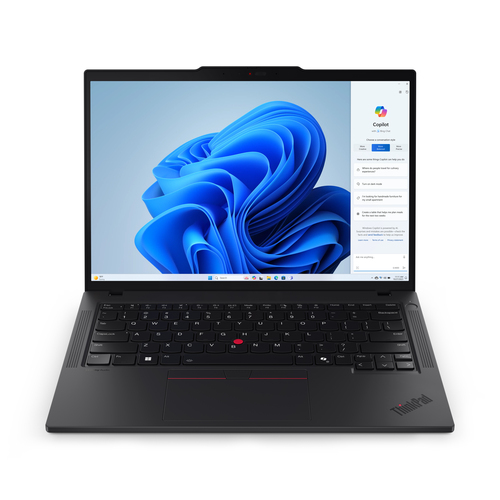
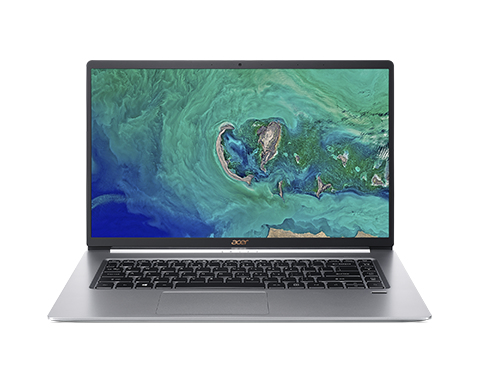
When it comes to choosing between Lenovo’s ThinkPad P14s Gen 5 and Acer’s Swift 5 SF515, it really does boil down to what you’re after. The ThinkPad’s horse-like AMD processor makes it a worthy contender in environments demanding raw power, such as IT hardware settings. Among conference calls and code compilations, it holds up well. Meanwhile, the Swift 5 steers towards the always-on-the-go professional, thanks to its lightweight frame, perfect for business travelers. Despite differing in Wi-Fi tech—ThinkPad boasts the future-ready Wi-Fi 6E, while the Swift fits snugly with Wi-Fi 5—each caters to unique tech needs. Intrigued by how these features align with your decision-making? A closer look reveals further insights.
How to Choose the Perfect Laptop for Your Needs
Picking that perfect laptop can be less daunting if you break it down methodically. First, pin down your main use cases, like video editing, traveling, or maybe gaming. What fits snugly with your needs? Next, scrutinize the tech specs required for those tasks. Don’t shy away from using industry tools if they’ll help.
Set a realistic budget. Once you have options in sight, test them out. It’s all well and good on paper—until you feel the weight or notice a lack of ergonomic fit. Finally, go through reviews and real-user feedback extensively. It’s as much about numbers as it is about lived experiences. This process may seem lengthy, but the insights gained ensure your choice is both wise and satisfactory—in every sense.Conclusion
After all’s said and done, remember—the best laptop isn’t the priciest or the one with the most features, but the one that suits your unique needs and financial plans. Emphasizing the balance between core specs and real-world applicability is key. Application aligns choice more with life’s everyday moments rather than pure tech fascination. Whether it’s seamless streaming, quick boot-ups, or tackle-me projects, the choice you make today sets the stage for future scenarios, too.
Include insight from technology solutions to navigate these waters smartly. Choices can indeed be daunting and thoroughly overwhelming, but don’t worry—staying informed through guides like this will keep the confusion at bay and your satisfaction high. Curious about what role other factors play? Surely, our category page links offer enriching perspectives. So, happy laptop hunting!Frequently Asked Questions
Common questions about Laptop
