
Why Choose a Laptop for Modern Business Needs?
Laptops have indeed become indispensable in the business landscape. Their evolution from bulky gadgets to sleek, high-performance machines highlights their growing role in modern workplaces. The emphasis on portability and versatility positions them as essential tools for any professional setting. Choosing the right laptop is no longer just a matter of preference; it’s a critical decision that directly impacts workplace efficiency and productivity. In this post, let’s explore why a laptop can make all the difference in today’s business environment.
Understanding Laptop Specifications Simplified
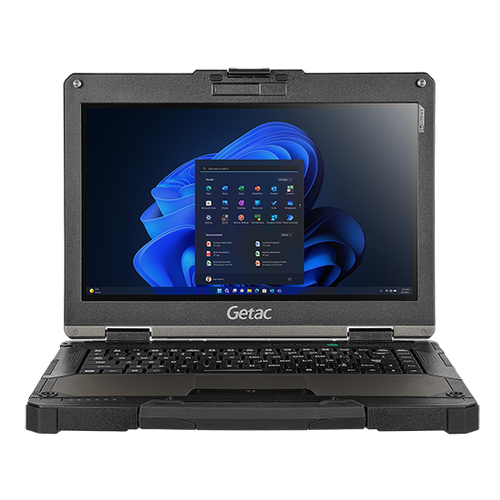
Deciphering laptop specs can feel a bit like deciphering a secret code, can't it? Processors, for example, often pit Intel against AMD in a bit of a friendly rivalry. Intel usually offers strong single-thread performance which is great for high-speed processing while AMD excels in multi-core performance, offering a broader scope for multitasking. But how do you choose the right one for your needs? Most business users find that an Intel Core i5 or AMD Ryzen 5 suffices for multitasking needs without breaking the bank.
Then there’s RAM—often labeled DDR4-SDRAM these days—which acts as your laptop’s short-term memory. More RAM typically means smoother operations, especially if you juggle multiple applications. But, how much is enough? For most business purposes, 8GB is a practical minimum, while 16GB offers a cushion for more intensive tasks.Storage is another critical consideration, with SSDs outperforming HDDs in speed and reliability. A fellow IT expert once misjudged this, opting for HDD to save costs, only to face slowness in data retrieval—something most businesses can ill afford. So, if speed and efficiency matter to you, an SSD is the way to go. Want to explore more about laptop specs? Check out this detailed guide to dive deeper.Advantages of Laptops Over Desktops
Laptops bring a unique advantage—portability—that desktop computers just can't match. Imagine having the power of your office PC at a café, a client’s office, or even on a plane. For those who travel often or work remotely, laptops ensure business doesn't miss a beat, enabling work from virtually anywhere. Desktops, tethered to one location, fall short in this regard.
Moreover, laptops are champions of energy efficiency. They are designed to consume less power, which is a win for both environmental sustainability and cost savings. And let’s not forget the reduced need for peripherals; laptops come with built-in solutions like keyboards and webcams, unlike desktops, which usually require various additional peripherals.Think of a sales team constantly on the move. Using laptops instead of desktops allows them to update client information on the go, leading to swifter decision-making and happier clients. This flexibility is something desktops, no matter how powerful, simply can’t offer. Want examples of how laptops significantly boost productivity? Our blog discusses this in depth in real-world scenarios.Choosing the Right Laptop for Your Business
Choosing a laptop can seem overwhelming, but focusing on your business's specific needs can simplify the process. The software you use should be a guiding factor; for instance, if you're running demanding design tools, you’ll need robust processing power. On the other hand, simpler tasks like document editing can suffice with less.
One ‘Quick Win’ approach is categorizing your industry needs: an architectural firm might prioritize graphic capabilities, whereas an accounting firm focuses on processing speed and RAM. Balance becomes key—premium features are enticing but costly. That said, opting for features you won't use is wasteful. In my experience, sophisticated models often aren’t worth it unless their full potential is realized.Cost considerations shouldn't be sidelined, either. There's a robust guide on balancing performance with budget that can offer further insights. And don’t forget scalability; laptops with upgrade options allow growth as your business evolves. Considering connectivity? The advent of Wi-Fi 6 ensures faster, more reliable connections, further highlighting the crucial balance of cost and functionality. For a comprehensive look at specific models, explore our recommendations for business-ready laptops.Technology Trends in Business Laptops
In today’s fast-paced world, staying ahead often means staying updated with technology trends. Touchscreen interfaces, once a novelty, now enhance productivity by offering more intuitive user interactions. This technology allows for a seamless blend of work and creativity, making complex tasks much less cumbersome without added equipment.
As we move forward, adoption of Wi-Fi 6E promises even more enhanced connectivity. This innovation means faster speeds and reduced latency—ideal for businesses that rely on server interactions or cloud services. An industry colleague recently shared how integrating this into their operations led to noticeably swifter workflows and less downtime.Expert predictions hint at ongoing developments, notably in AI integrations for business laptops that anticipate user needs, offering even further time-saving advantages. As these enhancements emerge, businesses that embrace them early enjoy a competitive edge. Want to see examples of successful tech adoption? Check out this case study showing cutting-edge tech integration in action.ASUS R543MA vs. Getac V110 G7: Which to Choose?
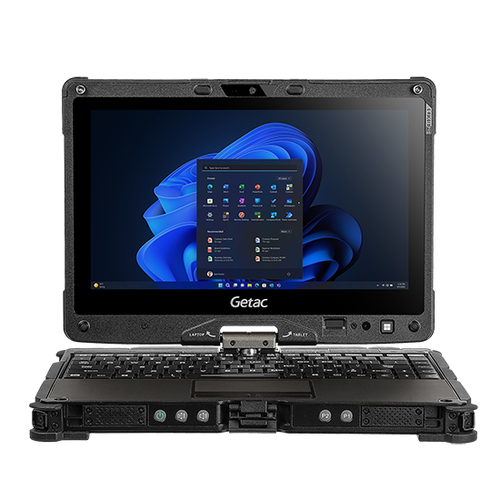
Comparative decision-making between the ASUS R543MA and Getac V110 G7 can steer your laptop choice in surprising directions. While ASUS R543MA showcases a straightforward design and is cost-efficient, making it appealing for routine tasks, Getac V110 G7 shines with high performance and rugged durability, perfectly suited for demanding environments.
The ASUS offers dual-storage options, providing convenience for basic tasks like spreadsheet management and email handling. Meanwhile, Getac’s enhanced processing and graphics can turn complex software tasks into manageable routines. Picture needing a reliable companion for travel and unpredictable conditions—Getac would shine in that scenario, whereas ASUS might be your go-to for regular office environments. For a more detailed guide on finding the perfect laptop, dive into this exploration of various options.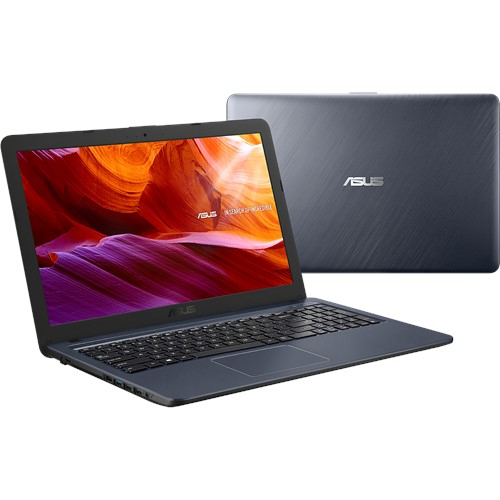
How to Set Up Your New Business Laptop
Getting a new laptop ready for business involves a few essential steps to ensure it's primed for efficiency. Start with a fresh initialization; set up your operating system and install fundamental software. Consider security as your next move—firewalls and antivirus should be active from day one. Connecting to cloud services ensures seamless data access anytime, anywhere.
'Pro Tips' suggest customizing your setup, such as optimizing battery-saving settings without sacrificing performance. Did you know that personalizing display and power settings can significantly enhance user experience? Common missteps, like neglecting regular system updates, could lead to unwanted slowdowns. Familiarize yourself with battery care to prolong its life—I’ve seen too many cases where careless charging habits led to premature battery failure. For more on customizing and setting up your device efficiently, have a look at this guide, which provides deeper insights and tips.Conclusion
As we wrap up, it's clear that aligning your laptop choice with business objectives is paramount. In an era where adaptability is key, choosing a device that supports future growth is not just prudent, it's essential. Consider not only the specs but how they’ll cater to your unique business needs. The landscape is evolving rapidly; ensuring your tools can adapt to changes safeguards against obsolescence.
In my experience, the right laptop enhances efficiency, propels productivity, and fosters innovation. Imagine a setup where technology seamlessly supports your business goals rather than becoming a bottleneck. That's the power of making informed choices. Take a moment to weigh these factors before deciding. If you're ready to take the plunge, explore our recommended business-ready laptops and take the first step toward future-proofing your business.Frequently Asked Questions
Common questions about Laptop
