
Is the Logitech ERGO K860 Your Key to Effortless Typing?
Meet the Logitech ERGO K860—your potential new favorite keyboard. With its ergonomic design and wireless capabilities, the K860 promises a revolution in typing comfort. Imagine less strain and more productivity at your fingertips. Does this sound like the upgrade your workspace needs? We've put together a detailed breakdown of its features and benefits here, just for you.
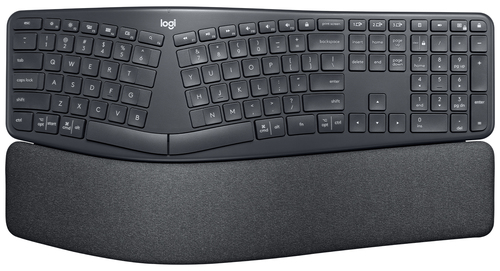
A Feel-Better Typing Experience
The ERGO K860 is designed with a unique curved and split keyframe, naturally guiding your hands into an ergonomic position. This thoughtful design supports better posture and can be a game-changer for anyone who spends long hours at a computer. You'll find it particularly beneficial if you're an IT professional or a tech enthusiast who values comfort.
An ergonomic setup isn't just a luxury—it's critical to maintaining your health and productivity. Investing in an ergonomic keyboard might seem like a small change, but it could save you from larger health issues down the line. Imagine no longer having wrist pain after a long day of coding or writing reports. For more insights into the design features that stand out, you might want to dive deeper. In my experience, truly ergonomic designs like this are what separate merely good keyboards from great ones.Three Layers of Comfort and Support
Let's talk about the ERGO K860's wrist rest—a seemingly small feature with a big impact. It boasts three layers: a surface layer made from easy-clean knitted fabric, a support layer with high-density foam, and a comfort layer using memory foam. Each layer plays its part in ensuring your wrists are pampered while you type. This isn't just about comfort; it's about preventing repetitive strain injuries.
In many scenarios, having the right wrist support can make a huge difference—we all know how easy it is to overlook until discomfort sets in. The support layer provides solidity without compromising on comfort, while the memory foam adds that extra bit of luxe. You can explore more about how this setup can enhance your typing experience through our detailed information here. Don't underestimate the power of a great wrist rest—it often goes unappreciated until you experience the difference for yourself.Precision Meets Performance with Perfect Stroke Keys
The Logitech ERGO K860's perfect stroke keys are crafted for precision. With a matte surface and satisfying tactile feedback, every keystroke feels deliberate and accurate—ideal for tasks requiring high typing speed and accuracy, such as programming or writing lengthy documents.
In real-world scenarios, such as during intense data entry sessions, accuracy is vital. The ERGO K860 delivers just that with its seamless keystrokes. It's a crucial feature that any IT professional would appreciate, where minor errors can have major consequences. Discover more about these performance features in depth. Typically, you'd expect such quality in high-end models, but the K860 offers it at a competitive price, making it a worthwhile consideration for your workspace.A Sustainable Design Choice
The environmental considerations of the ERGO K860 are impressive. It's made from 71% recycled plastic, its packaging is FSC-certified, and it's carbon neutral. In today's world, sustainable choices aren't just a trend—they’re essential. Businesses and consumers alike are shifting towards more eco-friendly products, and the tech industry is no exception.
Choosing a keyboard like the ERGO K860 doesn't just benefit your posture; it supports a healthier planet. This conscientious approach is refreshing and aligns with many of today's sustainable technology trends. In my opinion, it’s gratifying to see companies offering eco-friendly solutions without sacrificing quality. Incorporating tools that are both sustainable and high-functioning is a win-win for any tech setup.Product Review: Experience Real Value
The Logitech ERGO K860 is a standout in ergonomic design and sustainability. The pros are clear: its well-thought-out wrist support and eco-friendly materials set it apart. However, it does come with a higher price tag than average keyboards. In typical business settings, it performs excellently, providing comfort for prolonged use.
Customer feedback generally echoes this sentiment—many appreciate the long-term comfort it offers. In my experience, this keyboard is best suited for those who prioritize health and efficiency, even if it means a slightly higher investment. For a balanced view, check more in-depth reviews that explore its performance across various environments.How to Set Up Your ERGO K860 for Optimal Use
Setting up the ERGO K860 is straightforward. Begin by adjusting the height and tilt to what feels comfortable for you. If you're using it on a standing desk, take advantage of the adjustable tilt legs.
For wireless connectivity, you can choose between RF or Bluetooth. Simply follow the on-screen instructions to connect to your device. Once set up, remember to tweak the palm lift—this tiny adjustment can greatly enhance ergonomic benefits. If you ever face connectivity issues, check if your Bluetooth is enabled and try re-pairing the devices. Such minor kinks are usually easy to fix and rarely occur. A properly adjusted ERGO K860 can transform your typing experience entirely.Conclusion
The Logitech ERGO K860 is more than just a keyboard—it's an investment in better posture and typing efficiency. With ergonomic benefits and precision design, it's a strong contender in the market. Add to that its sustainable footprint, it's hard not to consider.
As you think about your keyboard needs, what do you value most? Is it comfort, sustainability, or cost? For more information and purchasing options, why not explore further? Perhaps it's time to transform your workspace with a choice that supports you and the environment.Frequently Asked Questions
Common questions about Logitech 920-009166 keyboard Office RF Wireless + Bluetooth English Graphite