Which Desktop Should You Choose? A Guide for Tech Explorers
In today’s world of technology, the desktop PC landscape can feel like a maze with endless options. From powerhouse setups to compact spacesavers, their utility in modern tech setups is undeniable. Desktops offer substantial benefits over their mobile counterparts, such as reliability and power. But with so many features and specifications swirling around, how does one choose the right machine for their unique needs? This guide aims to help you navigate the landscape and find the perfect fit.
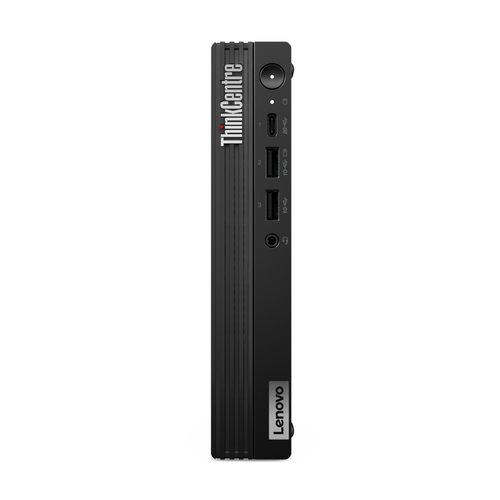
Exploring Desktop Features and Specifications
When it comes to choosing a desktop, understanding the features is key. At the heart of any desktop is the CPU—often the beating heart of your operations. Intel® Core™ processors typically lead the market, offering a range of power from i3 to the mighty i9. Most consumers will find an i5 perfectly balanced between performance and cost. Then there's RAM, which essentially determines how many tasks your computer can handle at once. While 8GB suits most users, gamers and professionals often aim for 16GB or more for smoother operation.
Let's not forget storage. SSDs have revolutionized the scene by offering faster data retrieval times than the traditional HDDs. A 256GB SSD paired with a high-capacity HDD means you don't have to choose between speed and space. Additionally, graphics decisions will be critical if gaming or design work is on the agenda, possibly requiring a dedicated GPU. Connective capabilities—whether it’s USB-C ports or Wi-Fi 6—can change your desktop’s ability to integrate into your digital life seamlessly. Design considerations such as a SFF or Mini PC might matter if space is a premium. However, in my experience, people usually prioritize internal specs over aesthetic design unless space is critically limited. For more specifics, you might explore category pages to compare options.The Benefits that Desktops Bring to Your Table
Why are desktops still holding their ground in a world fascinated by tablets and laptops? It boils down to a few crucial factors. Desktops are incredibly upgradable, meaning they can evolve with tech advancements rather than requiring a brand-new purchase. Swapping out a graphics card or expanding your memory can breathe new life into an aging machine. Not to mention, their longevity is a testament to their sturdy construction and repairable nature.
Have you ever tried to multitask on a laptop only to find performance dwindling? Desktops bring a performance punch that typically outstrips their portable counterparts. Professionals in fields like video editing or animation appreciate the sheer number of tasks a desktop can handle simultaneously. And gamers? The benefits of desktops in gaming realms, with sprawling displays and powerful GPUs, are well-documented. Desktops often serve as the backbone of a modern home office or business hub. In my experience, having a dedicated space that houses a beast of a desktop allows for a demarcation between work and leisure. Friends and colleagues often share anecdotes of how a desktop upgrade added years to their system’s relevance, which is a form of tech-savvy sustainability if you ask me.Practical Applications and Real-World Scenarios
Desktops provide practical solutions for diverse scenarios. In high-demand environments like media production, they handle sophisticated software that requires robust processing power, leaving laptops in the dust. Running design tools or rendering videos is usually smoother on a desktop, reducing time costs.
In the gaming world, desktops frequently offer superior customizability and power. Hardcore gamers often build their PCs from scratch, but even out-of-the-box models deliver better frame rates and visual fidelity than most laptops. Then there’s handling massive datasets for analysis. When you're knee-deep in graphs and projections, desktops' stability and speed can be a lifeline. Within IT services, desktops excel as reliable machines for developing and testing new solutions. Their reputation as powerhouses means they're less likely to buckle under pressure—a common tale among colleagues is the night-and-day difference seen when switching from a laptop to a desktop for coding. To find a machine that works for you, consider browsing more category options. Anecdotes from industry veterans often highlight scenarios where intensive applications demand the capabilities only a desktop can provide.Navigating the Desktop Marketplace
The desktop marketplace is vast, with choices aplenty. Budgeting is crucial; overspending on features that go unused isn't wise. Identifying reputable brands—those with a history of reliable products and strong customer support—can save headaches down the road. Consider online tech stores in your area like online tech stores in Pennsylvania for purchasing convenience.
Specific needs should guide your selection process, ensuring you pay for features you'll use. I always tell friends to avoid purchasing on aesthetics alone—a rookie error that can lead to disappointment. In my years of experience, a clear understanding of what tasks your desktop will handle makes a world of difference. Brands like Lenovo and ASUS have established themselves with various models catering to different needs. Familiarity with their performance levels can aid your choice significantly. Learning from others' experiences—evaluating reviews, and asking peers—can offer insights that sales pitches overlook. It can be about balancing raw specs with daily usability, and using personal buying tips to streamline your decision-making. Ultimately, it’s your desktop; it should fit your digital lifestyle like a glove.Comparing Top Choices: Lenovo ThinkCentre vs. ASUS PB63
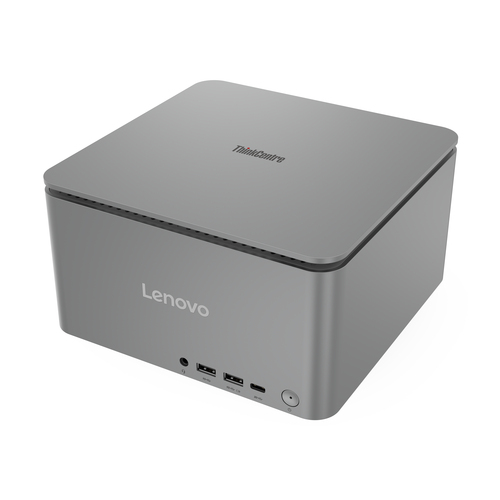
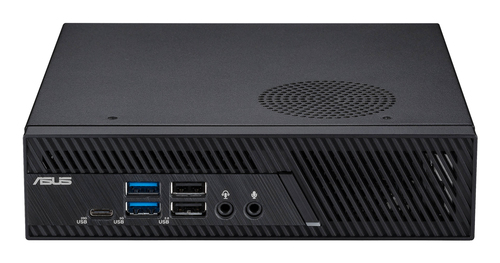
The comparison between this Lenovo ThinkCentre M90s Gen 5 and the ASUS PB63-SYS585PX1THR offers intriguing insights. Both sport Intel® Core™ i5 processors, promising robust performance. The Lenovo's RAM, however, usually provides a bit more headroom for multitasking. When it comes to graphics, the ASUS often takes the lead, making it a solid pick for visually intensive tasks.
Design differences are clear: Lenovo boasts a SFF, offering a snug fit for tight spaces, while ASUS’s Mini PC is tailored for those needing portability. Each model appeals to distinct tech-centric scenarios—like workstations with multiple monitors for increased productivity or sleek setups where aesthetics can't be compromised. For detailed specs, head over to the official Lenovo website for further exploration.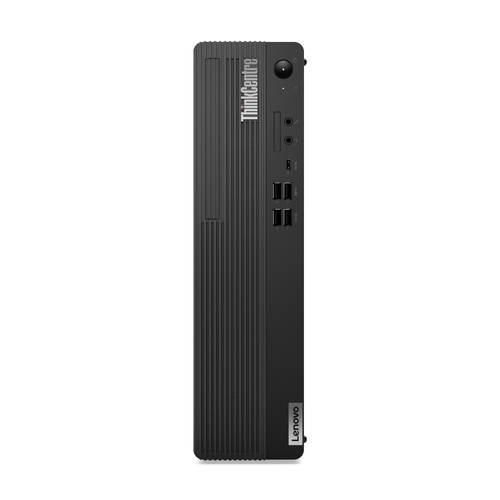
How to Set Up Your New Desktop: A Step-by-Step Guide
Setting up a new desktop might seem daunting, but it's straight-forward with the right approach. Begin by assessing your available space and connectivity needs; ensuring sufficient space for air circulation aids performance. Once positioned, connect peripherals like the mouse, keyboard, and monitor.
Software setup is where the magic starts. Install your essential programs, set up user accounts, and don’t skip the critical step of enabling security features. It’s easy to overlook, but worth the minor hassle—trust me on this. For model-specific instructions, vendor guides can be lifesavers, offering tailored insights. If you encounter glitches during setup, common troubleshooting tricks—like checking connections or updating drivers—usually resolve early hitches. Remember, the keys to a stress-free setup are organization and patience. And if things get confusing, there are setup guides available online that can assist you.Conclusion
As we end this exploration of desktop selection, it’s clear there’s no one-size-fits-all answer. Primary to making a choice is understanding what suits your requirements best—considering both features and functionality. Desktops offer incredible flexibility, but they have to match your specific needs to truly shine. That said, even the perfect desktop requires evaluation as technology evolves.
Remember our key points: pay attention to crucial features, appreciate the inherent benefits, and visualize your specific use cases. Desktops usually excel in performance, longevity, and customization, making them a smart investment. When you’ve weighed your options, venture into more category selections and make an informed purchase. Embrace desktops as a hub for everyday innovation, and you might find creativity thrives. Now’s the time to commit to a machine that balances elegant design with robust performance, keeps your future needs in sight, and paves the way for exciting digital adventures. Ultimately, the desktop you choose today could be the cornerstone for tomorrow’s tech landscape. Decide wisely; the tech world is your oyster.Frequently Asked Questions
Common questions about Desktops