Is an AI-Powered PC the Right Tech Upgrade for You?
Ever wondered how AI can fit into your daily tech use? With AI-powered PCs gaining popularity, their potential to transform everyday computing tasks is catching everyone's attention. These machines are not just about speed but about smarter, personalized experiences. Curious about what this could mean for you? Well, dive into our comprehensive guide as we unravel the bells and whistles of AI-powered PCs. Could this be the next big tech upgrade you're longing for?
Understanding AI-Powered PCs
These shiny new tech wonders, known as AI-powered PCs, are not just your typical computers. What sets them apart? It’s all about incorporating artificial intelligence directly into the hardware and software. Imagine having processors that don't just execute commands but actively learn your usage habits. These PCs leverage AI algorithms to boost efficiency—helping your system perform optimally by predicting your needs.
Think of these systems as having a brain of their own. They adapt to your computing style, much like a personal IT assistant always anticipating your next move. It's fascinating how they manage to adjust settings automatically to suit your preferences and improve speed over time. By understanding your habits, from opening applications to managing resources, AI can personalize your experience significantly. Over to the hardware side—advanced processors are the heroes here. With deep learning techniques, your PC gets smarter. And it’s not just about performance. These components work seamlessly to save energy and lengthen battery life. Interestingly, they're becoming so intuitive that they could even troubleshoot issues before they disrupt your workflow. So, whether you're a tech novice or enthusiast, these AI-powered machines offer a peek into the future of personalized computing. Curious to learn what features might suit your needs? Check out our guide on AI-PC components.Key Benefits of AI-Powered PCs for Everyday Users
Now, let's dive into how AI-PCs can make everyday tasks a breeze. One of the top advantages is their ability to boost productivity. With task automation taking over mundane tasks, you can focus on more thrilling projects. Imagine a digital concierge offering intelligent suggestions to streamline your workflow.
These PCs stand out with their energy efficiency. Not only does this save you from frequent trips to the charging station, but it also impacts your electricity bill in a good way. The personalization factor is akin to having a tailor-made tech experience. For creatives, intelligent editing tools identify patterns in your work and offer quicker, more accurate results. With such functionalities, users often find themselves saving valuable time and resources. Speaking from personal experience, after transitioning to an AI-PC, the convenience can't be overstated. It's like having a personal assistant who knows your needs sometimes even before you do. Cost-saving here isn't just about electricity; it's about getting more done in less time, which is priceless. Curious to peek further into these benefits? Explore how AI-PCs can revolutionize your business for some hands-on examples and case studies.Practical Applications and Use Cases
So what can these AI-powered PCs really do for you, practically speaking? Take professional settings, for example, where data analysis becomes more intuitive with AI's help. The ability to process vast datasets swiftly and accurately can be a game-changer for businesses relying on analytics. What's more, AI-powered PCs don’t just excel in crunching numbers; they shine in creative workloads too.
In creative professions, imagine having a system that intuitively understands your design patterns, speeding up the creative process and reducing editing time. Meanwhile, in gaming, these systems dynamically enhance graphics performance, lead to smoother gameplay, and adapt game settings for optimal experience. It's like your PC is right beside you, whispering strategies in your ear! Personally, I've seen IT professionals simplify workflows by offloading routine tasks to AI tools on their PCs. It’s as if you have an additional team member that never clocks out. Surprisingly, these systems often mimic the AI features we've come to love in our smartphones but on a grander scale. If you want to explore more such use cases, check our detailed list of practical applications.Potential Challenges and Considerations
Of course, while AI-powered PCs are packed with benefits, it's important to recognize challenges too. There’s no escaping the fact that these machines might come with a higher price tag. The cost might be a hurdle for those on a tighter budget. Especially if you're not tech-savvy, the complexity of utilizing AI features fully can seem daunting at first.
Another consideration is the learning curve. Maximizing the AI capabilities requires time and effort—which not everyone is willing to spare. In your journey to unlock these features, you might encounter hiccups akin to learning a new software suite. But fear not; many users find online communities and tutorials extremely helpful resources. Data privacy also warrants attention. With AI systems capable of learning and remembering your patterns, concerns over how this data is stored and used are valid. Depending on your region, regulations can vary significantly, so staying informed is crucial. For beginners, a prudent approach is to weigh these factors before diving in entirely. A seasoned user might encourage embracing the learning curve as part of the exciting journey into advanced computing. For more insights into overcoming these hurdles, you might find our guide on investing in AI-PCs helpful.Comparing the DELL Pro QBM1250 Plus vs. Getac S510
When comparing the DELL Pro QBM1250 Plus with the Getac S510, several distinctions stand out. The DELL Pro offers compact power—ideal for users who need high performance without a large footprint. Its design allows for snug fits into any workspace, making it a fantastic choice for those with limited space.
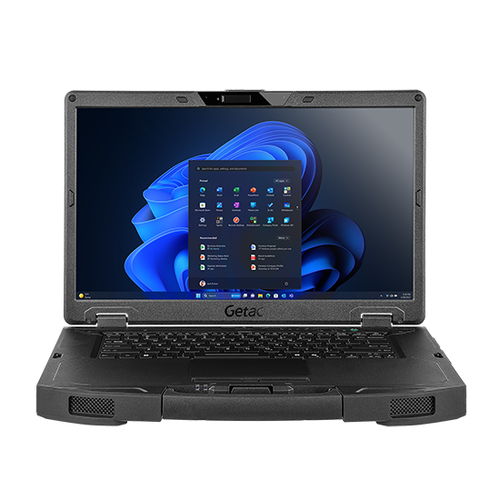
On the other hand, the Getac S510 shines with its robust screen and additional AI customizations. Designed with durability in mind, it boasts a sleek, rugged profile perfect for outdoors and demanding environments. When it comes to connectivity, both models excel but cater to different needs. While the DELL may better fit a slick home office setup, the Getac tends to gravitate towards professional environments where reliability trumps aesthetics. Performance differences are subtle yet significant depending on your focus. Whether selecting one for your corporate job or creative studio, understanding these differences can streamline your decision-making process. Curious about more tailored comparisons? Our business tech reviews offer deeper dives.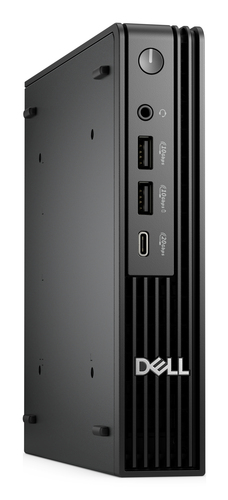
Getting Started with Your AI-Powered PC
Ready to dive into the world of AI PCs? The initial setup is straightforward. After unboxing, follow the installation and boot-up instructions—new user tutorials are usually part of Windows 11's user-friendly experience.
Configuring AI features might look complicated, but it doesn't have to be stressful. Start by setting your preferences in the control panel, allowing the AI system to learn from your usage patterns gradually. Simple steps like linking your cloud accounts can enhance your experience exponentially. There are several forums and guides to help optimize setup. Whatever bumps you hit, remember it's common. Troubleshooting might make you scratch your head sometimes, but generally, solutions are a Google search away. For users familiar with tech ins-and-outs, it’s just about exploring and discovering your favorite shortcuts. Interestingly, that first power-on often opens a gateway to infinite possibilities—each more exciting as you uncover. For those eager, this beginner's guide to mastering AI-PCs may become your new best friend.Conclusion
Now that we’ve mulled over the various aspects of AI-powered PCs, where do you stand? These systems promise exceptional productivity, heightened efficiency, and the allure of personalization. But bear in mind the potential drawbacks—price and a learning curve not everyone might embrace instantly. So, is this the right tech upgrade for you? Assess your current setup, compare the needs you’ve anticipated, and then consider the tangible benefits and time savings these PCs could offer.
Ultimately, the decision is personal and dependent on your unique requirements and ambitions. If still unsure, exploring alternatives with your budget and priorities in mind could pay off in the long run. Considering dipping your toes in before diving head-first? A trial with an AI-powered PC could be revealing. Ready to take the leap? Browse our diverse range of AI-powered PCs today.Frequently Asked Questions
Common questions about AI PC