Are Desktop PCs Still Worth It in Today's Portable World?
In an era where sleek laptops and portable devices steal the limelight, desktops might seem like relics of the past. But dismissing them would overlook their ongoing value in reliability, performance, and certain specialized tasks. Desktops aren't just about raw power, they’re about versatility and lasting power. In today’s blog, we’ll uncover why these traditional powerhouses still hold their ground, offering features and benefits that remain relevant. Let's dive in and see how desktops continue to serve various needs efficiently.
Performance: When Speed Is Non-Negotiable
Desktops generally outperform laptops in terms of sheer processing power and stability. The reason? They often house high-performance CPUs and substantial RAM, enabling them to tackle intensive tasks with minimal effort. Imagine rendering a high-definition video or getting immersed in a visually demanding game—tasks where speed is paramount.
I remember upgrading my desktop a couple of years ago—swapping out the processor and adding more RAM transformed my device overnight. It went from struggling with complex video editing software to handling multiple high-demand applications seamlessly. Moreover, desktops have unparalleled cooling capabilities, keeping them efficient and extending their lifespan. While laptops overheat easily during extended use, desktops can maintain peak performance without missing a beat. This makes them indispensable for creative professionals and gamers aiming for uninterrupted, lag-free sessions. All this power comes with the benefit of future-proofing; you can keep updating components as your needs grow, adeptly maintaining performance levels that truly meet modern demands. When portability isn’t the priority, desktops stand unmatched in performance. Explore more about high-performance desktops here.Customization and Upgradability: Making It Your Own
One of the most compelling reasons to own a desktop is the immense potential for customization—each component is like a piece of a puzzle you can tailor according to your needs. Unlike most laptops that are often limited in customization, desktops allow you to swap out graphics cards, increase storage, or even change motherboards.
In my experience, it's akin to building a sports car; you decide on every detail to boost speed and style, creating something uniquely yours. This adaptability enhances longevity, ensuring your system stays current without recurring significant investments. Current market trends show an uptick in users customizing desktops, seeing it as an adventure where the end result is optimized for personal preference and task demands. What's more, you’ll often find that this journey expands your technical knowledge—a side benefit of investing in custom PCs. And, on a more practical note, such customizability means better alignment with specific use cases, offering profound operational efficiency. If you’re curious about how desktops can be optimized for different tasks, you might want to read up on desktops tailored for business solutions.Use Cases: Where Desktops Truly Shine
Desktops are certainly not a one-trick pony; their functionality spans numerous specialized fields. Consider complex software development—desktop PCs provide ample power needed for compiling and rendering extensive codebases without grinding to a halt. They also excel in 3D modeling, supporting high-res graphics and complex calculations essential for design professionals.
In IT services, desktops remain the backbone of network monitoring and large-scale data processing. Not to mention their value in immersive environments like 360 Virtual Rooms, where their stable performance is crucial. I recall setting up an online tech store in Pennsylvania where desktops played pivotal roles in everyday operations, from handling transactions swiftly to supporting inventory checks. Their robust nature meant continuous uptime and efficient service. While laptops offer flexibility, desktops come into their own in environments where power and stability are non-negotiable. If you're setting up similar tech operations, investing in a solid desktop structure may spare you future headaches. For specifics on business tech operations involving desktops, check out this in-depth exploration.Budget Considerations: Quality Without the Premium Price Tag
When thinking about cost, desktops often emerge as more budget-friendly than high-end laptops with similar specs. They provide great computing power without the premium price tag.
A decent desktop setup can cost considerably less than a premium laptop. It allows you to invest in what truly matters: performance and longevity. Opting for mid-range components can yield a high-performing unit that doesn't break the bank. Plus, desktops can be upgraded as needed, preventing the need for expensive replacements. From an environmental standpoint, desktops allow for sustainable upgrades, reusing chassis and power supplies, thus reducing electronic waste. It's not just about price; it’s about an investment that pays off with reduced environmental impact over time. Compared to consistently replacing laptops, desktops offer a cost-effective way to keep up with tech advancements. Think of it as investing smartly now to save more in the long run. When you consider total cost of ownership, desktops frequently win out. Meanwhile, there are plenty of budget options to explore when configuring your next PC adventure. Interested readers can learn more about making budget-friendly tech choices here.Comparing Compact Powerhouses: Lenovo ThinkCentre neo 50q Gen 4 vs. Lenovo ThinkEdge SE30
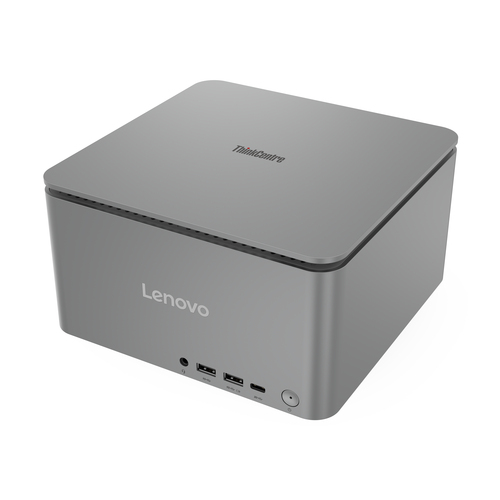
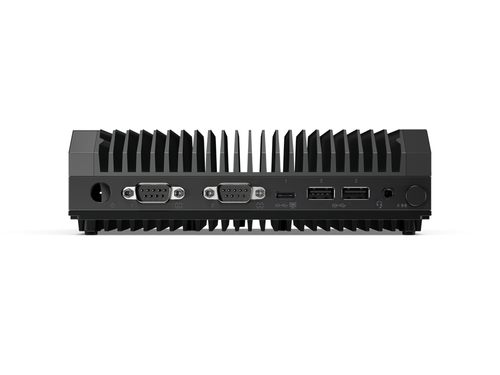
Let's talk about two compact desktops, the ThinkCentre neo 50q Gen 4 and the ThinkEdge SE30. The former boasts an Intel® Core™ i5 processor paired with 32 GB RAM, making it a powerhouse for typical office tasks and multitasking environments. Its superior memory and storage capabilities allow for seamless operation without lags.
On the other hand, the ThinkEdge SE30, with its Intel® Core™ i3, is tailored for IoT applications and excels in environments where integrating multiple smart devices is key. In practical terms, the neo 50q Gen 4 suits intensive office applications, whereas the ThinkEdge SE30 shines in compact spaces demanding connectivity over brute force processing. Depending on your business needs—be it standard office workload or specialized connectivity—you'll find one of these models ideal. Each offers strengths suited to specific professional scenarios. For more on how these models fit different business operations, check out our comparative review.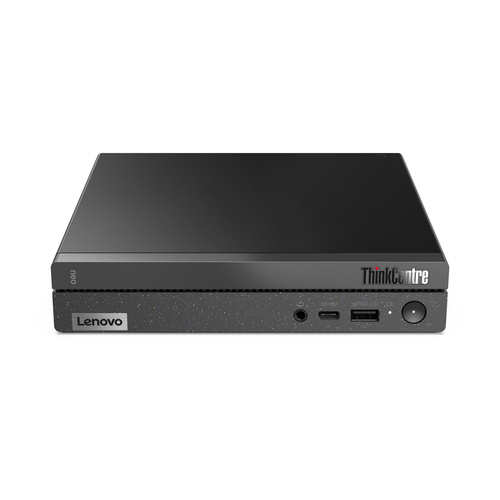
How to Set Up Your New Desktop for Maximum Efficiency
Setting up a new desktop is simple if you know where to start. First, unpack and position your desktop unit, ensuring it has adequate ventilation. Connect essential peripherals like keyboard, mouse, and monitor before powering it up.
Adjust initial settings, such as screen resolution and system preferences, to suit your workflow. Next, ensure all drivers are up-to-date by visiting the manufacturer's website. It's crucial to have the latest software for optimal performance. Troubleshooting is part of the process. You may encounter common issues like display or connection errors, easily fixed by checking connections or restarting. Organizing cables neatly behind your desk can drastically improve workspace aesthetics—consider cable management accessories for this purpose. Finally, set up software tools vital for your tasks. Install antivirus software to keep your system secure. A structured approach ensures you hit the ground running with your new machine. For more on optimizing desktop setups, see our guide to setting up your workspace.Conclusion
Desktops continue to offer valuable benefits despite the rise of mobile computing devices. Their blend of power, customization, and cost-effectiveness makes them an unbeatable choice for serious computing while remaining budget-friendly. We've looked at various scenarios where desktops excel, from resource-heavy work tasks to maintaining affordable and sustainable tech solutions.
If portability isn't crucial, choosing a desktop for your primary computing needs could be an optimal decision. As technology evolves, desktops adapt with it—often faster than their portable counterparts. This adaptability proves invaluable for specific professional settings where power and stability are crucial. Before making a decision, consider your unique needs and long-term tech goals. If intrigued by these capabilities, perhaps it’s time to explore Lenovo desktops to see how they fit with your personal and professional needs. Remember, the right choice ultimately depends on you! Discover more by visiting our product category page.Frequently Asked Questions
Common questions about Desktops