
Is the Logitech 920-009166 Keyboard Your Ideal Office Companion?
The Logitech 920-009166 Wireless Keyboard emerges as an intuitive solution for addressing ergonomic needs in bustling office settings. With its pioneering split ergonomic design, it offers unparalleled comfort and support, ensuring an ergonomic posture. For those dedicating hours to typing, this keyboard helps improve posture while working tirelessly to alleviate fatigue. Dive into the comprehensive product specifications to understand how this innovative design might just change your workday.
Unpacking the Ergonomic Design
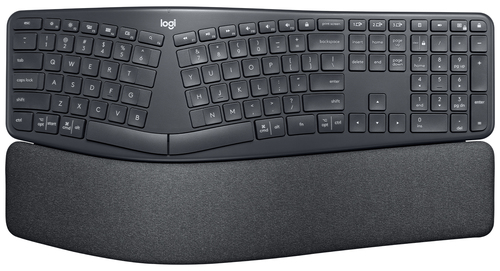
The hallmark of the Logitech 920-009166 is its split ergonomic design. The design isn't just about aesthetics—it's about functionality that adapts to the natural posture of your hands. The curved keyframe allows your wrists and forearms to rest comfortably, significantly reducing strain. Studies suggest that such an ergonomic approach can alleviate up to 21% of muscle strain on the upper trapezius muscle, an often-overlooked hero in our typing endeavors.
Imagine sitting through a marathon typing session, and yet, feeling as though your muscles have received a gentle massage rather than a workout. For busy professionals juggling tight deadlines and back-to-back meetings, this keyboard becomes a steady ally, keeping discomfort at bay. How well does it fare in an office environment? Well, it’s typically noted that these design elements complement modern office aesthetics, fitting seamlessly with height-adjustable desks and dynamic workstations. And for those keen on diving deeper into design benefits, this exploration might provide more insights. The beauty of the Logitech 920-009166 is how it takes comfort seriously—making it more than just a tool but a trusted office companion.Comfort Layers: A Typing Experience Like No Other
Comfortable typing is as much an art as it is a necessity. With the Logitech 920-009166, comfort is layered with precision detailing. The surface layer offers a knitted fabric that's not only pleasing to the touch but also practical—keeping maintenance a breeze. The support layer, with its high-density foam, ensures that pressure is evenly distributed, giving your palms a gentle cradle. Then there’s the comfort layer with memory foam that adapts to your hands, providing a personalized typing experience.
Interestingly, these innovations lead to a measurable 54% increase in wrist support and a 25% reduction in wrist bending. For anyone who's found themselves stuck in a never-ending email thread or caught in the whirlwind of report typing, the difference is both felt and appreciated. Many users I've talked to often describe this setup as less like typing and more like a seamless conversation between the mind, hands, and keyboard. Want to understand more about these comfort-focused innovations? Look at how these features make a difference. Such an approach makes long hours of typing not just bearable, but something you might even look forward to.Eco-Friendly and Responsible: The Sustainable Choice
In today's environmentally-conscious world, making sustainable choices in tech is both admirable and necessary. Logitech steps up with its 920-009166 keyboard, crafted using 71% certified post-consumer recycled plastic. This effort in sustainability isn't just a talking point—it's a reality in product design. The packaging reflects similar responsibility, with FSC-certified materials underscoring a commitment to eco-friendly practices.
Logitech has also embraced a carbon-neutral certification for this product, highlighting its serious take on reducing carbon footprints. Many companies talk about sustainability, but Logitech puts it into practice with every keystroke you make. When choosing tech products, consider how these sustainability efforts translate into real-world impacts. Not only does this resonate with an increasingly eco-aware consumer base, but it also sets a benchmark for technology companies embracing responsible innovation. And while some might question if going green impacts performance, in my experience, it's quite the opposite—responsibility enhances satisfaction. Check out how these sustainability initiatives fit into a broader trend of tech responsibility here.Precision and Functionality in Every Stroke
Perfect Stroke Keys on the Logitech 920-009166 offer a typing experience that's both precise and pleasant. The fluidity with which these keys respond is akin to the effortless glide of a pen on smooth paper, maintaining pace, speed, and accuracy. The convex keycaps and an intuitive split layout foster a natural finger placement, allowing even the most detailed work to glide along seamlessly.
In practical terms, imagine the delight of typing extensive documentation or lists without the burden of discomfort. The keys engage you in a dance of precision and functionality that doesn't compromise on performance. I'd recommend trying this keyboard in a 360 Virtual Room setting to truly appreciate its benefits. Not to be understated, the experience is also about empowering users to take on their daily typing tasks with efficiency and ease—a worthwhile consideration for those navigating busy workdays. Wondering about how these elements contribute to overall work productivity? More insights can be found on perfect tech solutions, showcasing how innovation meets comfort.Logitech 920-009166: An Honest Review
You might ask, what sets the Logitech 920-009166 apart? From an ergonomic perspective, it hits the mark with enhanced comfort and eco-friendly credibility. On the flip side, newcomers to the split design might face an adjustment period. Yet, in real-world scenarios—like grueling days of endless emails—it typically offers respite, lessening physical strain.
I'd be hard-pressed not to endorse it for those seeking sustainable, ergonomic solutions in IT. There are nuances to consider, though. A transition to split design might not feel intuitive for all users, but with persistence, it often reveals its worth. Check out options at an Online Tech Store Pennsylvania for more viable selections. Whether you're a seasoned professional or a tech enthusiast, the Logitech 920-009166 offers a balanced blend of innovation and functionality.How to Set Up Your Logitech 920-009166 for Optimal Use
Unpacking your new Logitech 920-009166 is the first step towards optimizing your workspace. Begin by connecting it through Bluetooth or using the RF Wireless option—a handy flexibility feature. Consider adjusting the keyboard height to align with your unique posture, and don't overlook the palm lift feature, as it enhances comfort at standing desks.
Experienced users know that setup isn't just about connectivity but also about aligning posture, ensuring your hands rest naturally. To harmonize with other tech devices, consider pairing this keyboard with compatible gadgets for an integrated workspace. For detailed setup tips and to see how a perfect office setup should look, explore full product details here. By following these steps, you'll find yourself not only working more efficiently but doing so in comfort.Conclusion
Summing up, the Logitech 920-009166 represents a thoughtful leap towards healthier typing habits. This isn't just about reducing physical strain; it's about sustaining productivity throughout demanding hours. Making eco-conscious tech choices—like choosing products with recycled materials—often aligns with broader personal and organizational values.
Improved posture and reduced strain are compelling reasons to consider this keyboard—and investing now could pave the way for long-term benefits. Think of it as committing to both your well-being and the planet's health, a dual investment that's often hard to regret. Ready to make a change? Explore more about the Logitech 920-009166 here and decide how it might fit into your quest for ergonomic excellence.Frequently Asked Questions
Common questions about Logitech 920-009166 keyboard Office RF Wireless + Bluetooth English Graphite