
How to Pick the Right Laptop for Your Needs
In today's tech-centric world, choosing the right laptop can feel like finding a needle in a haystack. With countless models boasting varied specifications, making the best choice is no small feat. Matching a laptop's specs to your personal or professional needs ensures both satisfaction and productivity. Our guide cuts through the tech jargon, helping you zero in on what truly matters, making your decision-making process less daunting and more empowering.
Understanding Key Specifications: What Really Matters?
When it comes to laptops, specifications are often touted as the holy grail of performance. So, where should your focus lie? Typically, the processor—often considered the brain—can't be overlooked. Whether it's the ubiquitous Intel Core series or AMD's renowned Ryzen, each has its strengths. A robust processor ensures smooth computational tasks, essential if you're gaming or editing videos.
Besides the CPU, RAM plays a pivotal role. More RAM means your laptop can handle more applications simultaneously, reducing those pesky slowdowns during spreadsheet crunching sessions. Aim for at least 8GB for general use, or 16GB if you're into heavy multitasking. Then there's storage. Should you go for an HDD or SSD? SSDs are faster, quieter, and consume less power, which makes them ideal for speedy startups. However, they often come at a premium per gigabyte compared to traditional HDDs, which might still appeal to those requiring large storage but on a budget. This brings us to common tasks like gaming, video editing, or managing business suites—each demands different specs. Knowing your primary activities can guide you on which laptop category fits best.Exploring Various Benefits: Beyond the Specs
It's not all about specs; real-world benefits often trump raw data. Think about enjoying crisp visuals on a high-resolution display—it’s like going from regular TV to HD. This can be game-changing for designers or anyone who watches movies on the go. Long battery life, another superstar feature, could mean the difference between productivity and frustration—especially during long flights or conferences without easy access to outlets.
A lightweight design isn't just an aesthetic quality; it's a practical one. Imagine carrying a bulky laptop through multiple terminals—it can become quite cumbersome. A thinner model enhances portability without necessarily compromising on power. Then there's that sweet spot—finding balance between performance and form factor. It's what makes one laptop perfect for a college student, and another ideal for a traveling business exec. For me, it’s often about what “just works” in daily scenarios. A powerful machine that’s too bulky to move around easily may not always be the best choice despite its impressive specs. Meanwhile, a gorgeous lightweight design that’s lacking in stamina might defeat the purpose if it can’t power past lunchtime.Use Cases: Finding Your Perfect Match
Laptops aren't one-size-fits-all, and recognizing your primary use case can steer your decision immensely. For gamers, models with advanced GPUs and striking refresh rates are non-negotiable. It's like having the latest sports gear—without it, you're off your game. Imagine taking on demanding titles with a less capable machine—it simply won't cut it.
However, for business users, practicality often takes the wheel. Efficient productivity software, rapid boot-up times, and secure data handling stand as pillars for a suitable business machine. Whether hopping between meetings or drafting proposals, seamless operation is key. Creative professionals, too, have different needs. Laptops that offer stunning color accuracy and substantial processing power for tasks like video rendering or design software are essential. Think of it like an artist choosing a canvas—what works for one might not suffice for another. Referring back to our previous insights might help paint a clearer picture. At the end of the day, it's all about finding that category that aligns with your daily challenges and aspirations.Alternatives and When to Consider Them
Let's face it—premium isn't always the best path forward. You'll often find that budget-friendly options can hold their own with a bit of savvy comparison. This is particularly true if your primary tasks revolve around word processing, web browsing or other light use cases.
Technology trends like cloud computing can tilt the scales. With many applications and storage moving online, the need for massive onboard storage often diminishes. In my experience, I've had my share of regrettables—once jumping on a high-spec model only to realize many features went unused. It's a reminder that having the 'latest' or 'greatest' isn’t always a wise financial choice. Instead, focusing on what aligns with your needs and budget is often more rewarding. Consider a past mistake of mine—splashing out on a top-tier model that only left me stretching my budget thin, while a more economical choice would have sufficed. So, don't be swayed solely by what seems cutting-edge now, but evaluate its congruence with your actual usage.Comparing Top Picks: ASUS ROG Strix SCAR 15 vs. Acer Aspire 5
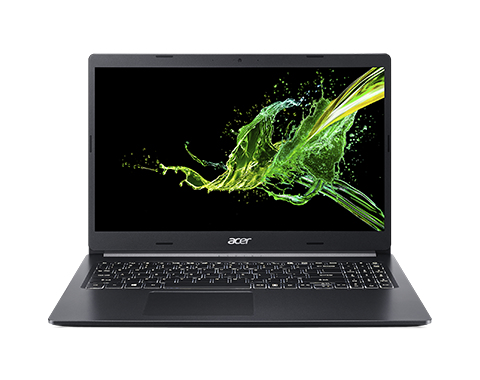
When examining the ASUS ROG Strix SCAR 15, known for its gaming prowess, and the Acer Aspire 5, with its sleek portability, differences quickly surface.
The ASUS model excels with its high-performing GPU and CPU, making it a powerhouse for intense gaming sessions, where every frame counts. Its distinctive design might scream 'gamer,' but it delivers thrilling graphic capability you wouldn’t want to miss out on. On the other hand, the Acer model often appeals with its understated elegance—a perfect fit for business users who value travel-friendly laptops without compromising on essential features like a functional CPU for document management. The real choice, then, depends on whether you value cutting-edge gaming performance or streamlined portability for business tasks.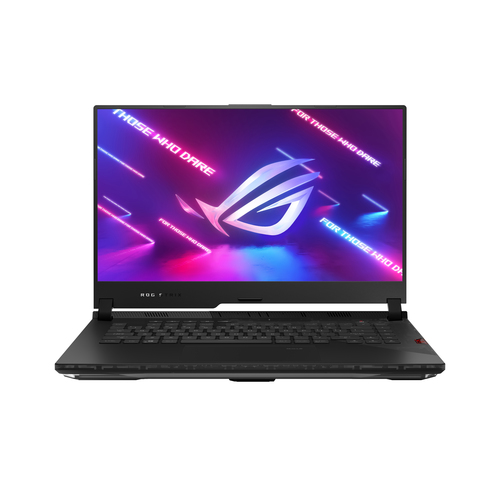
How to Set Up Your Laptop Efficiently
So, you've chosen the perfect laptop. What's next? Unboxing is your first step—remove all the protective covers and check for any initial defects.
Next, dive into software installations. Prioritize essentials like an antivirus, office suite, and web browsers. Don't forget the firmware updates! They’re crucial for optimal operation, ensuring everything runs smoothly. Following guidelines in this business tech setup article can make the process even easier. Installing cloud storage solutions should be a priority, aligning with best practices in safeguarding your data and easing file access across devices. Connecting peripherals comes next—wireless mice, external storage, or printers add versatility. Ensure your data security by enabling system firewalls and setting robust passwords. Take a moment to explore hardware settings; optimizing display and power management maximizes battery life. Finally, configure backup solutions to shield against data loss. Follow these steps, and you'll be on your way to a seamless, optimal laptop experience.Conclusion
In the bustling sea of laptop choices, anchoring your decision in what's most crucial for your unique needs cannot be overstated. You'll often find that comprehending technical specifications while balancing with practicality spells the difference between an ideal purchase and a regrettable one.
Remember, it's not merely about hitting the buy button on the shiniest model available. Rather, the art lies in aligning technology solutions with daily tasks and financial realities. Take another look at our comparisons and how-to guides—they breathe life into words and ease your laptop journey. Rest assured, making a well-informed choice brings lasting happiness, aligning your tech with life's demands seamlessly. Ready to explore more options tailored to you? Dive back into these valuable resources when making your choice.Frequently Asked Questions
Common questions about Laptop
