
How Do You Choose the Right Laptop for Business in 2023?
In 2023, your laptop is more than just a device—it's your portable office, your communication hub, and your productivity powerhouse. Choosing the right one can make the difference between seamless workflows and frustrating hiccups. This article dives into essential considerations, from specifications like processor speed to portability and sustainability, offering insights into finding that perfect business companion.
Decoding Laptop Specifications: What Really Matters?
When it comes to business laptops, not all specifications are created equal. At the forefront is the processor—often called the 'brain' of the computer. A decent processor like the Intel Core i5 or AMD Ryzen 5 can significantly impact how quickly tasks are completed, particularly for demanding applications like data analysis or design software. In my experience, spending a bit more here often pays off in speed and efficiency.
Next, we have RAM, which directly impacts a laptop’s ability to multitask. Typically, a minimum of 8GB is recommended for most business functions, though 16GB ensures smoother operation, especially if you're running multiple applications simultaneously. There's nothing worse than tabs lagging during an important presentation! Storage is another area not to overlook. While SSDs are pricier than traditional HDDs, their speed and reliability are unmatched, making them well worth the investment for business users. The quick boot times and efficient file retrieval they offer simply can't be beat. Balancing these specifications according to your everyday business needs is key. It's much like assembling the right team—each component plays an integral role in ensuring overall performance and productivity. For more on computer specs and their implications, check out our specifications guide for further insights.The Power of Portability: Why Screen Size and Weight Matter
Portability isn’t just a buzzword—it's a game changer. Let's picture a traveling professional: smaller, lightweight laptops often make their day easier, literally lightening the load. A 13-inch or 14-inch model fits snugly on tiny airplane trays and in bags, helping professionals stay productive on the go without breaking a sweat. On the flip side, larger screens, around 15 inches, offer ample space for multitasking, ideal for desk-bound roles where device mobility is less of an issue. Imagine having multiple spreadsheets and video conferences open without the clutter. In these cases, weight becomes less of a concern.
Balancing size and weight with ergonomics and screen quality is crucial. A larger screen can enhance your workday if you're docked much of the time. Conversely, a compact design better suits those frequently changing venues throughout the day. The sweet spot often lies somewhere around 14 inches, providing both a sufficient display area and commendable portability. This nuanced approach helps cater to both ends of the spectrum—mobility and functionality. Curious about the trade-offs? Check out our run down on portability for a deeper dive.Connectivity and Compatibility: Staying Connected 24/7
In today’s fast-paced business environments, connectivity is non-negotiable. As wireless technology advances, laptops supporting the latest Wi-Fi standards, like Wi-Fi 6, offer faster and more reliable connections. This is particularly advantageous for cloud-based applications and video conferencing. Remember that colleague who always has networking issues during calls? They probably need an upgrade.
Also, USB ports, HDMI, and even the good ol' Ethernet can be lifesavers in various settings. For instance, an HDMI port easily connects your laptop to projectors during meetings, while ample USB ports are crucial for peripherals like external drives and web cameras. Don’t overlook USB-C, which is becoming a new universal connector with its fast data transfer capabilities. It's all about flexibility, making sure your laptop can adapt to different environments. Beyond hardware, software compatibility ensures your systems work seamlessly with your company’s tech ecosystem. Whether it’s ensuring your antivirus is up-to-date or that the cloud syncs effortlessly, a compatible setup saves time and boosts efficiency. For insights on how best to achieve this, explore our in-depth connectivity guide.Sustainability and Longevity in Modern Business Laptops
In 2023, businesses are not just thinking about cost-effectiveness but also environmental impact. Choosing a laptop with green certifications can reflect your business's commitment to sustainability. This doesn’t just feel good; it often aligns with energy savings. Energy-efficient laptops typically come with extended battery life and durable designs, reducing the need for frequent replacements. From reducing e-waste to saving on electricity bills, these features contribute positively to your bottom line.
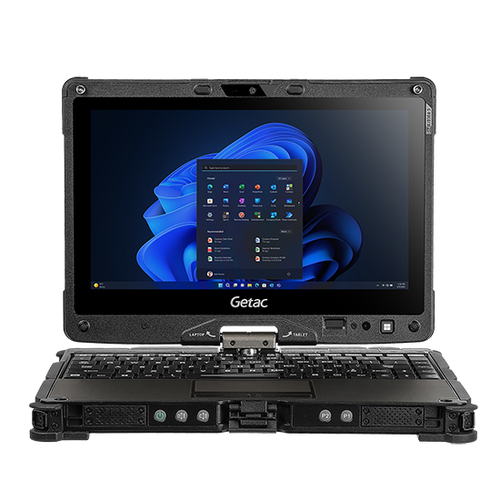
Speaking of longevity, understanding build quality is essential. Laptops purpose-built to last longer—often touted as 'rugged' or 'enterprise-grade'—withstand the wear and tear of daily use far better than consumer models. It’s like buying a sturdy pair of boots; the initial cost can be higher, but the extended life pays in spades over time. This approach to longevity can be vital for budget optimization—lessening the frequency of tech refresh cycles invariably saves money. For those intrigued by the industry's move towards sustainability, our green tech blog post has all the juicy details.DELL Pro vs. Lenovo ThinkPad: Which Suits Your Needs?
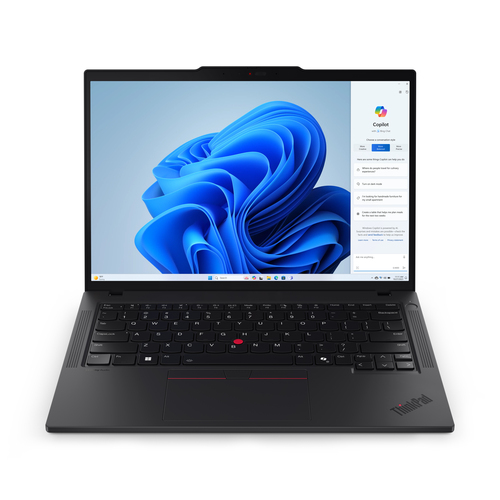
Deciding between this premium DELL Pro 16 Plus PB16255 and the highly portable Lenovo ThinkPad P14s Gen 5? Well, both have their merits. On the DELL side, there's remarkable AI integration paired with a robust battery life, perfect for those demanding uninterrupted power for on-the-fly calculations and data processing. Meanwhile, Lenovo's superior RAM and lighter framework make it a traveler’s dream, slipping quietly into any setting without weighing you down. That said, the extended RAM on the ThinkPad handles multitasking like a pro, saving time when jumping between complex tasks.
If your role demands long hours away from outlets, DELL’s strengths in battery longevity and AI capabilities might tip the scales. On the other hand, for offices or professionals constantly on the move, Lenovo’s portability trumps with elegance and ease. Weighing personal and role-specific needs will guide you to the right choice. For further details, consider visiting Lenovo’s official site.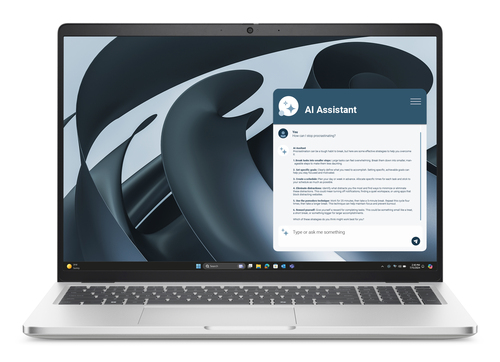
Setting Up Your Laptop for Optimal Business Performance
Once you've made your choice, setting up your laptop correctly is pivotal. Begin with the initial system setup, ensuring your OS is up-to-date. Create user accounts with strong passwords—don't underestimate basic security steps. Installing essential software, like office suites and communication tools, comes next. Remember to enable automatic updates to patch vulnerabilities swiftly.
Avoid the common mistake of skipping security settings. Enable encryption and multi-factor authentication for business emails and files. On-the-go, you want your devices and data secure. Don't overlook cloud integration, which is literally a game changer for accessing files anywhere. Last, but certainly not least, regular system backups should be routine—use external drives or cloud services for redundancy. It's all part of laying a foundation for durable business performance. For in-depth setup guidance, peek at our business optimization setup guide for more detailed steps.Conclusion
As we've explored, choosing the right laptop involves balancing specs, portability, connectivity, sustainability, and proper setup, all aligning with your business's unique needs. Let’s not forget that your laptop should be more than a tool—it's an extension of your work ethic. By delving into what matters most—be it long battery life for those on the move or sheer processing power for complex tasks—you’re investing in productivity. Remember, a well-thought-out purchase not only enhances business operations but frequently reduces costs in the long run.
So, as you ponder your next business laptop venture, evaluate what truly matters for your role. For additional insights, including our curated list of perfect business laptops, feel free to dive deeper into our resources to ensure an informed purchase. Your next great investment could be just a click away. Don’t forget to check our categories for more options tailored to your needs.Frequently Asked Questions
Common questions about Laptop
