Are Desktops Still the Best IT Products for Your Business Tech Needs?
Desktops continue to be a cornerstone of business tech due to their enduring reliability and robust performance capabilities. In a world bustling with portable laptops and tablets, one might wonder what keeps the desktop relevant. The answer lies in modern advancements that have equipped desktops with unmatched power and efficiency. Could it be that desktops still hold the key to unlocking your enterprise's potential over more portable options?
Exploring the Power of Modern Desktop Processors
Today's desktop computers boast powerful processors, leveraging the significant strides made by industry titans such as AMD and Intel. The AMD Ryzen™ and Intel® Core™ chips are designed to handle complex computations, elevating performance and enabling seamless multitasking. Picture a scenario where your business relies heavily on data analysis. A robust processor means reports generate faster, ensuring decisions are made on timely, accurate data—crucial in today's market. Consider 'clock speed' and 'core count'—tech jargon that dictates how fast tasks are executed and how many tasks can be processed simultaneously. Typically, higher clock speeds mean faster performance for individual tasks, while a greater core count enhances multitasking capabilities; a distinct advantage for software development environments where compiling and testing require horsepower. Modern desktops excel here, transforming these specs into practical benefits for your business. Whether running heavy simulations or using resource-intensive software like CAD applications, desktops usually deliver unparalleled performance. Learn more about processor innovations in our guide to choosing the best desktop for your needs.
Benefiting from Robust Memory and Storage Solutions
Memory, or RAM, is the lifeline for any desktop's ability to handle simultaneous operations. With advancements like DDR4-SDRAM and the emerging DDR5-SDRAM, desktops now offer higher bandwidth and efficiency, supporting more active applications without slowing down. When your team is editing video or managing extensive spreadsheets, adequate RAM ensures smooth operation and saves precious time. Storage solutions have seen remarkable improvement, shifting from traditional Hard Disk Drives (HDDs) to Solid State Drives (SSDs). This change isn't just about space—though SSDs often come with lower storage capacity compared to HDDs—but more about speed. Desktops with SSDs boot up faster and access data with minimal lag, which can be transformative in a fast-paced business environment. Deciding on storage requires finding a balance between speed and capacity. While SSDs deliver optimum speed, incorporating high-capacity HDDs provides extra storage room at a lower cost. For businesses running virtual machines or large databases, a hybrid approach might be the sweet spot. Interested in diving deeper into storage options? Check out this article on balancing speed and memory for business desktops.
Why Desktops Offer Customization Unlike Any Other
When it comes to customization, desktops stand unrivaled, allowing for upgrades tailored to evolving business needs. Whether it's enhancing your GPU to drive better graphics for design tasks or boosting RAM for more seamless multitasking, desktops offer incredible flexibility. In my experience, a simple storage upgrade turned an underperforming office desktop into a powerhouse capable of supporting an entire team’s data crunching needs—proof that small changes can lead to significant improvements. This ability to customize isn't just about current performance. It's a long-term investment that supports sustainability. Old components can often be resold or repurposed, maximizing ROI and reducing waste typically associated with tech upgrades. For businesses, this translates into lower costs and the confidence that their hardware can adapt alongside them. If you're thinking about long-term desktop strategies, consider exploring this comprehensive overview of customization and its perks.
The Design and Ergonomics of Modern Desktops
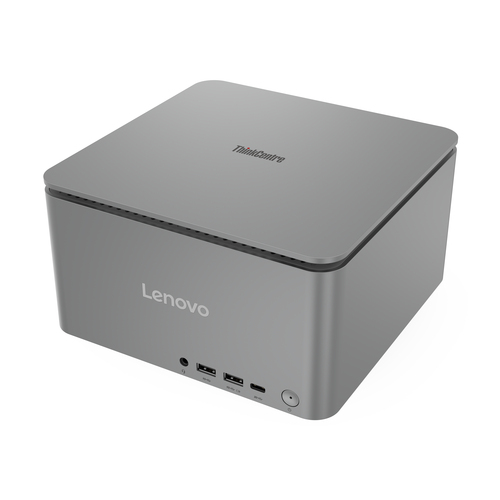
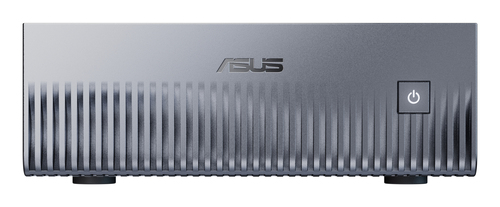
Think of modern desktop designs as merging form with function—an approach that’s often dismissed as trivial but can lead to significant productivity gains. New models showcase compact mini PCs and space-saving slim PCs that fit seamlessly into any workspace. Their efficient cable management and low-noise features transform desks into organized, calming areas conducive to focused work. Aesthetics matter more than many realize. An attractive, ergonomic setup doesn’t just boost morale—it’s linked to increased job satisfaction and productivity. Who wouldn't feel more at ease in a well-organized, pleasant environment? Pro tip: Consider designs that allow for easy upgrades and maintenance; it’s a future-forward move (this ergonomic design approach can spark some ideas). From silent cooling systems to easily accessible ports, modern desktops enhance the user experience with subtle yet essential features. Integrating them into your business could be key to a more harmonious, efficient workplace.
Comparing ASUS ExpertCenter PN52 and DELL Pro Slim QCS1250
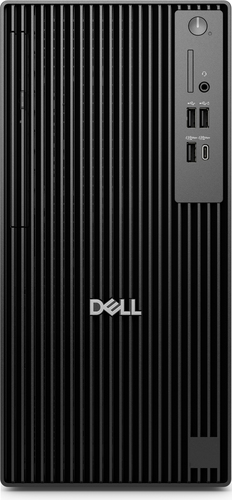
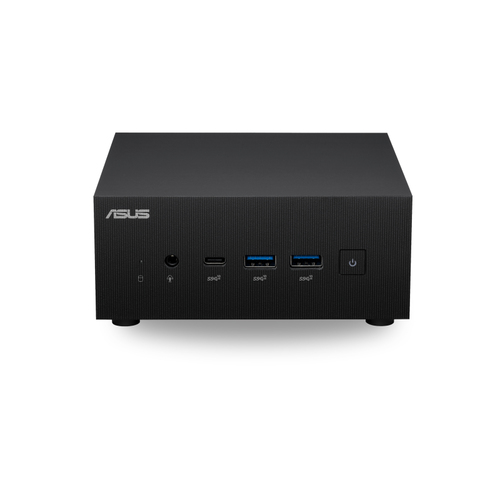
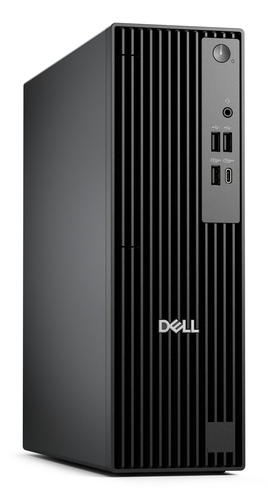
Which is more suited for your needs: the ASUS ExpertCenter PN52 or the DELL Pro Slim QCS1250? Both offer compelling solutions, but differences matter. The ExpertCenter PN52’s AMD Ryzen™ 7 5800H is typically more adept at multitasking demands than the Intel® Core™ i5-14500 found in the Pro Slim. When it comes to RAM and SSD configurations, the PN52 usually offers slightly higher flexibility for businesses requiring intense processing power. Price and brand recognition play crucial roles. Generally, ASUS is known for innovation and reliability, whereas Dell often focuses on robust customer support. Considering cost-performance balance—each shines in different areas, and selecting between them often narrows down to specific business requirements explore full specifications. Both choices promise quality; however, your particular needs will dictate the best fit—don’t just take our word for it, compare them yourself.
How to Set Up Your Desktop for Optimal Business Performance
Just got a new desktop? Let’s make sure you get up and running smoothly. Start with careful unpacking, checking that you have all necessary components—nobody likes surprise missing parts. Next, connect essential peripherals like your monitor and keyboard. It isn't as daunting as it sounds, but if you’re unfamiliar, follow a beginner-friendly guide. Moving to software setup, ensure Windows 11 Pro is configured for peak performance. This means keeping your software up-to-date and adjusting your system settings for security and efficiency. Delve into BIOS settings—often overlooked, they can improve boot speeds and hardware efficiency when correctly set. Remember, safeguarding your data is vital. Regular backups prevent loss and allow recovery in unexpected cases. Also, invest in a reliable antivirus to defend against common threats, making your desktop secure and resilient. There’s beauty in readiness, so give yourself peace of mind by exploring more setup tips.
Conclusion
In wrapping up, it's clear that desktops hold a distinct place in fulfilling business tech needs. While laptops offer undeniable portability, the power and customizability of desktops often tilt the scale, justifying their selection for specific requirements. As business landscapes evolve, considering future scalability should guide your choice over mere price or initial specs. Investing in a desktop is about more than immediate needs—it's preparing your business for long-term efficacy and adaptability. Ready to embark on this tech journey? Dive into the array of available desktop models that cater to your specific goals. And when you're exploring options, the Asus official site is a great resource. For broader options, check our desktop selection for tailored advice and get equipped for today's business scape.
Frequently Asked Questions
Common questions about Desktops