
Is the Logitech 920-003051 Wireless Keyboard Still a Smart Buy for Everyday Work?
If you’ve ever dealt with cable clutter, dead batteries, or a keyboard that feels fussy, the Logitech 920-003051 keyboard RF Wireless English Black is built to simplify the daily grind. It’s practical IT hardware for home offices, small businesses, and anyone shopping an Online Tech Store Pennsylvania or anywhere in the United States for dependable Technology Solutions. The tiny Unifying receiver, RF Wireless convenience, and clean black finish stand out. See the Logitech 920-003051 product details or other business-ready IT products. Logitech’s official wireless accessory lineup shows where it fits.
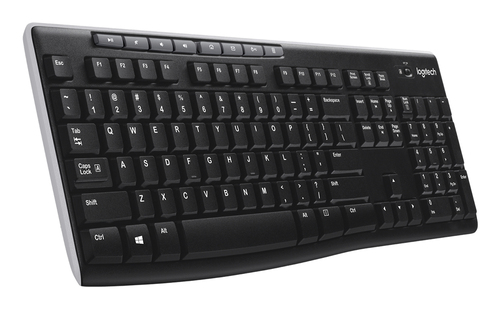
What You’re Actually Getting Under the Hood
The Logitech 920-003051 keyboard keeps things simple in a good way. It uses RF Wireless connectivity instead of Bluetooth, so you usually get a more stable plug-and-play experience with fewer pairing headaches. The English layout and black finish make it look at home on most desks, but it’s clearly designed for everyday office work, not flashy gaming.
One of the nicest touches is the Logitech Unifying receiver. That tiny USB dongle can support multiple compatible peripherals, which matters when you’re juggling IT hardware on a laptop, desktop, or netbook. The 2.4 GHz wireless link and 10-meter range make it behave a lot like a cord in a normal office, just without the cable mess. Security is solid too, with 128-bit AES encryption—useful in business settings where privacy matters. If you want the full wireless keyboard specs, or need practical workplace accessories for technology solutions, those pages help. Compared with premium keyboards, this one skips backlighting and multi-device switching. That might sound limiting, but honestly, not everyone needs extra bells and whistles. In my experience, the best keyboard is often the one you stop thinking about. If your goal is reliable typing and fewer distractions, the Logitech 920-003051 keyboard makes a pretty sensible case for itself.Why the Battery Life and Wireless Range Matter More Than You Think
A 24-month battery life is one of those specs that sounds nice on paper, then quietly saves your day in real life. For busy teams, fewer battery swaps usually mean fewer interruptions, less downtime, and fewer support tickets for IT Services. That’s a big deal when the keyboard sits on a reception desk, in a shared office, or in a home setup where nobody wants to think about maintenance.
The auto standby feature helps stretch power even further, and the lack of an On/Off switch is actually a feature, not a flaw, for most users. It feels low-maintenance, almost “set it and forget it.” Auto-frequency switching also helps reduce signal loss in crowded wireless spaces, which is handy when your office is packed with Wi‑Fi routers, headsets, and other RF Wireless gear. If someone’s working at a classroom station, front office, or 360 Virtual Room demo area, dependable wireless behavior matters more than people usually expect. For more context, see reliable business peripherals for laptops for business and the Logitech 920-003051 keyboard overview. There’s a clear market trend here: buyers want simple, durable Technology Solutions more than ever. Software changes fast, but a keyboard still needs to do one thing well—respond when you type. Sure, ultra-premium models may offer extras, yet this Logitech 920-003051 keyboard wins by being practical, not flashy.The Everyday Features That Make Work Feel Easier
The eight hot keys are where this Logitech 920-003051 keyboard really starts earning its keep. Dedicated shortcuts for Internet, e-mail, play/pause, and volume can shave a few seconds off repetitive tasks, and those seconds add up over a week. If you’re jumping between Software tools, video calls, and browser tabs, quick-access keys keep your hands on the keyboard and your workflow moving.
I’ve seen people buy expensive peripherals and still end up using only three buttons—this keyboard avoids that trap. It’s especially handy for general office staff, students, remote workers, and small teams using Tech for Business setups. A receptionist can mute a call, an admin assistant can jump to e-mail, and a sales rep can control media without learning a weird layout. That kind of simplicity is underrated. If you want the Logitech 920-003051 product page or related IT products for cleaner desk setups, those links are worth a look. There is one tradeoff: this isn’t a high-end ergonomic split keyboard. If you need specialized wrist support or custom macro mapping, you’ll probably want something else. But for most users, the balance of comfort, convenience, and straightforward productivity is strong. It’s also a nicer fit for buyers comparing broader business workstation gear with compact accessories that don’t overcomplicate the desk.Setup, Compatibility, and Where It Fits Best
Setup is one of the strongest selling points here. You plug the USB receiver into a desktop, laptop, or netbook, and start typing—usually no software installation, no pairing menu, no drama. That plug-and-play feel is exactly what busy offices, classroom labs, and home users want when they don’t have time to babysit drivers.
The Unifying receiver also helps reduce USB clutter, which is especially useful on compact laptops and docking stations. If you’re rolling out multiple workstations, the easy-to-deploy workplace peripherals category can save time, and business-ready keyboard options for Pennsylvania buyers are useful for local sourcing. Common mistakes to avoid? Don’t lose the USB receiver, don’t assume every Logitech device is Unifying-compatible, and don’t expect gaming-grade customization. Ideal use cases include office workstations, remote work setups, back-office IT hardware replacements, and travel-friendly secondary keyboards. Bluetooth keyboards can be great, no question, but RF Wireless usually wins when you want fast, dependable setup without pairing friction. Meanwhile, if you’re also evaluating mobility-focused devices, the battery and simplicity angles on modern business hardware and the connectivity-first approach to laptops show why dependable peripherals still matter.Honest Review: Who It’s Best For and What to Watch Out For
Here’s the honest take: the Logitech 920-003051 keyboard does a lot of things right without trying to be fancy. Strong wireless reliability, very long battery life, easy setup, useful hot keys, and the convenience of the Unifying receiver make it a solid everyday work keyboard. For many buyers, that’s exactly what they want from IT products and Technology Solutions.
The drawbacks are pretty clear too. It’s not mechanical, it doesn’t offer advanced customization, and it won’t impress someone chasing backlighting or multi-device switching. If you’re a gamer or a heavy typist with very specific feel preferences, you may want to keep shopping. But for office staff, students, hybrid workers, and small-business teams, it usually delivers where it counts. In my experience, this is the kind of keyboard that quietly earns its keep. If your budget is tight or your use case is straightforward, premium options aren’t always worth it. This model makes the most sense for dependable Tech for Business use, especially when you just want something that works day after day. A final spec check on the Logitech 920-003051 details page can help before you buy.How to Set It Up in Minutes Without the Usual Headaches
Step 1: unpack the keyboard and find the tiny Unifying receiver. Step 2: plug it into an available USB port on your desktop, laptop, or netbook. Step 3: power on the keyboard if your package setup requires it, then test typing in a document or browser field. Step 4: check key response, volume controls, and the hot keys. Step 5: keep the receiver plugged in for regular use.
A few best practices help a lot. Keep spare batteries on hand even though the 24-month battery life is generous, avoid placing the receiver behind thick metal surfaces, and store the keyboard in a dry area to extend life. If it seems unresponsive, try another USB port, confirm the battery is seated correctly, and move closer to the receiver. Those are the usual quick fixes. When you’re deploying multiple units in an Online Tech Store Pennsylvania environment, label receivers and peripherals during setup. It saves confusion later, especially in mixed office fleets. And honestly, this is one of those IT hardware products that usually just works—which is exactly what busy users want.Conclusion
The Logitech 920-003051 keyboard RF Wireless English Black isn’t trying to be the flashiest keyboard on the market, and that’s a big part of its charm. It focuses on the basics that matter: reliable RF Wireless performance, long battery life, strong AES encryption, easy setup, and practical hot keys. For general users, office teams, and anyone buying dependable IT hardware, that combination is often more valuable than extra features they may never use.
Of course, it won’t be the perfect fit for everyone. If you want premium tactile feedback, deep customization, backlighting, or a more modern multi-device ecosystem, you’ll probably keep shopping. But if your goal is simple, durable, low-maintenance business tech, this model makes a lot of sense. That’s especially true across Technology Solutions, laptops for business, and everyday IT Services environments in the United States. My advice? If the spec sheet matches your needs and you like the low-fuss approach, this is a smart buy. Take one last look at the Logitech 920-003051 product details and decide if it’s the kind of keyboard you’d be happy using every day.Frequently Asked Questions
Common questions about Logitech 920-003051 keyboard RF Wireless English Black