
Are Laptops Still the Best Choice for Business Computing in 2023?
Laptops have undeniably transformed how businesses operate over the years. Their portability, increased processing power, and versatile nature have made them indispensable. Yet, with the rapid rise of tablets and ultra-thin devices, a debate continues on the relevance of laptops in the modern, tech-savvy business landscape. Could laptops still hold their ground as the best option for business computing in 2023? Let’s dive in and explore the possibilities.

Anatomy of a Modern Business Laptop
In today’s fast-paced business world, the components under the hood of a laptop have become crucial for seamless operations. Powerful CPUs, now often housing multiple cores, are crucial for handling complex computational tasks efficiently. Pair this with ample RAM, usually starting from 16GB, and you're set for smooth multitasking—you won’t find yourself staring at the dreaded spinning wheel of doom when switching between hefty spreadsheets and CRMs.
Robust SSD storage isn't just about capacity; it’s also about speed. With data transfer rates that leave traditional HDDs in the dust, accessing and saving large datasets becomes a breeze. It’s this kind of performance that keeps decision-making data at your fingertips when you need it most. Connectivity options further enhance a laptop’s utility. The inclusion of Wi-Fi 6, a game-changer in wireless tech, facilitates speedy and stable internet access, an essential for cloud services integration. This connectivity ensures that whether you're pulling files from a remote server or on a video call with a client across the globe, there’s minimal disruption. For more about connectivity and why Wi-Fi 6 is vital, you might find this detailed analysis insightful.Maximizing Productivity with Laptops
One of the vibrant advantages of laptops is their ability to blend portability with powerful functionality. Picture this scenario: you’re flying between cities, preparing for an important presentation. With a capable business laptop, pulling together key data and crafting a compelling presentation becomes an in-flight activity rather than a pre-flight stressor. That said, laptops prove invaluable not just for road warriors but for remote setups too—offering a stable platform for working from home with efficiency that desktop setups often can't match.
Beyond the physical aspects, software capabilities play a massive role in enhancing productivity. Integrated solutions like tech solutions for entrepreneurs offer efficient task management and communication tools, streamlining teamwork regardless of locations. Whether it’s leveraging advanced spreadsheet formulas or enabling instantaneous messaging, the right applications can transform a laptop into a powerhouse of productivity. You might also appreciate reading about tech solutions for entrepreneurs that further highlight laptops' versatility in these scenarios. Indeed, laptops allow for dynamic transitions between tasks and locations, a necessity in today’s agile business environment. With laptops, productivity isn't merely a concept but a tangible, achievable reality.Cost vs. Benefit: Choosing the Right Specs
Navigating the laptop market can feel like walking a tightrope between budget and performance. While the allure of high-end models is undeniable, the truth is not every business needs—or can afford—the priciest options available. For most average business needs, a model equipped with an 8th Gen Intel Core i5 processor often hits the sweet spot, delivering robust performance without breaking the bank.
Small businesses, particularly, might find these models appealing—they strike a balance between cost-effectiveness and sufficient power for handling everyday tasks, from document editing to basic data processing. However, I'd say it's crucial to consider the specific tasks your laptop will need to perform. Investing in a machine with slightly more power upfront might save you a headache down the line when software demands increase. For insights into balancing performance with budget, check out this guide. As always, it's wise to assess the potential for upgradability, ensuring the laptop won’t become obsolete too quickly. Flexibility in storage and RAM upgrades can make a world of difference in extending lifespan, making models with these features truly versatile choices. The key is aligning purchase decisions with your business’s unique needs, enabling you to maximize the value derived from your investment.Future Proofing Your Business Laptop
Planning for the future is as crucial with technology as in any aspect of business. One effective approach is to select laptops that support hardware upgrades. Having the option to increase RAM or upgrade to larger SSDs without replacing the entire machine prepares businesses for growing data demands. This forward-thinking choice can be a lifesaver when software enhancements require more memory or storage.
Operating systems play a pivotal role, too. Opting for laptops with future-ready operating systems enhances compatibility with emerging software. As AI and machine learning trends grow, ensuring your device can accommodate related applications becomes an important consideration. Consider those models with track records for sustaining performance through updates—after all, consistently smooth functionality is golden in high-pressure environments. Looking at industry trends, peripheral add-ons are another smart investment. Innovations like portable external GPUs add computing power when needed without necessitating a whole new laptop. It's about creating a nimble tech environment. For models known for upgradability and longevity, see examples of laptop solutions tailored to evolving business needs. Future-proofing is as much about foresight as about choosing hardware—it’s about embracing adaptability in the digital age.Comparing the ASUS Vivobook 17 vs. Acer Aspire 5: A Business Perspective
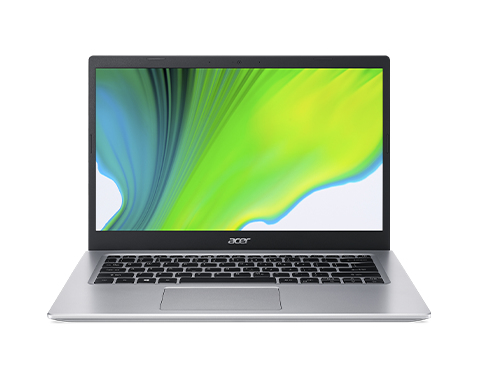
In a side-by-side comparison, the ASUS Vivobook 17 and Acer Aspire 5 cater to distinctive business needs. The Vivobook 17 boasts an expansive 17.3” display, perfect for immersive viewing—an asset when managing large datasets or hosting presentations. This contrasts with the Aspire 5, which leans in with a robust CPU and superior RAM, ensuring speedier processing times, ideal for multitasking and performance-intensive tasks. On the storage front, the Vivobook offers ample space, making it advantageous for data-heavy operations.
Meanwhile, the Aspire stands out for environments where speed is paramount. It’s this versatility—between display splendor and processing power—that sets these laptops apart. Understanding unique business requirements helps inform which specs will quintessentially meet everyday use. Each has its merits, depending on whether the focus is more on processing or presentation.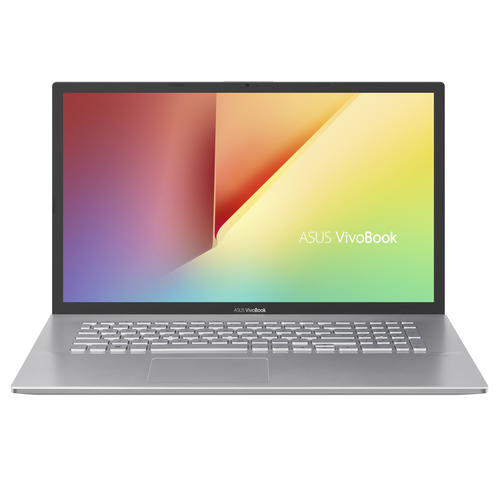
How to Optimize Your Laptop for Business Use
Optimizing your laptop from the get-go can elevate its performance to meet business demands. Start by launching the initial setup wizard, which guides you through personalized configurations. Ensure your operating system is updated to the latest version to maximize security and efficiency. Once your OS is ready, remove any pre-installed bloatware—these unnecessary programs can slow down your system.
Next, install essential productivity applications tailored to your business needs. My suggestion? Prioritize those preferred by your teams as it promotes uniformity and ease of use across devices. Configuring security settings, including setting up firewalls and antivirus software, is vital for protecting sensitive business data. Establishing network connections, particularly if using public Wi-Fi, requires an added layer of security—consider a reliable VPN service. In my experience, routinely maintaining these elements can vastly improve a laptop's service lifecycle, keeping it running like new for longer. Implementing these steps not only prepares your machine for daily tasks but ensures it's a robust gateway to productivity.Conclusion
To conclude, laptops continue to offer substantial advantages for business computing, from their portability to robust functionality. Compared to other devices, they provide a harmonious balance between performance and convenience, essential for both stationary office tasks and on-the-go needs. Yet, it’s valid to question obsolescence, given how swiftly technology progresses. Staying attuned to trends—like AI integration—and choosing devices with future-readiness in mind can minimize these concerns. Before finalizing a purchase, aligning your laptop choice with specific business needs, budget constraints, and available tech support is crucial. Ultimately, if you’re still unsure whether laptops are the right call, exploring our detailed guide might inspire more confidence in your decision-making process. Remember, the right technology can redefine your business narrative.
Frequently Asked Questions
Common questions about Laptop